
When your AI receptionist should hand a call to a person
An AI receptionist can answer, book and take messages, but some calls need a person right now. How to decide which calls get transferred, how a transfer works and how to set it up so someone actually picks up.
Why the hand-off matters
Some callers want a person, full stop. Others start with a simple question and end with something only you can decide. An AI receptionist that answers every call needs a clear rule for these moments, or the caller ends up explaining everything twice.
A good hand-off has two parts: deciding which calls should reach a person, and making sure a person is there when the call arrives. Both are choices you make in advance, not something to leave to chance on a busy afternoon.
Three ways a call can end
Before you set up transfers, it helps to see where they fit. On WiseUnit, a call ends in one of three ways:
- Answered or booked: the receptionist answers from the facts, website pages and documents you added and approved, or books an appointment into Google Calendar, Calendly or Cal.com and confirms it only once the booking exists.
- Callback request: the caller needs your team, but it can wait. The receptionist takes the reason, a preferred callback time and a priority.
- Transfer: the caller needs a person now, and the receptionist connects the call to your transfer number.
Which calls should reach a person
Most calls should end in the first two. A transfer interrupts whoever picks up, so keep it for calls where waiting would make things worse.
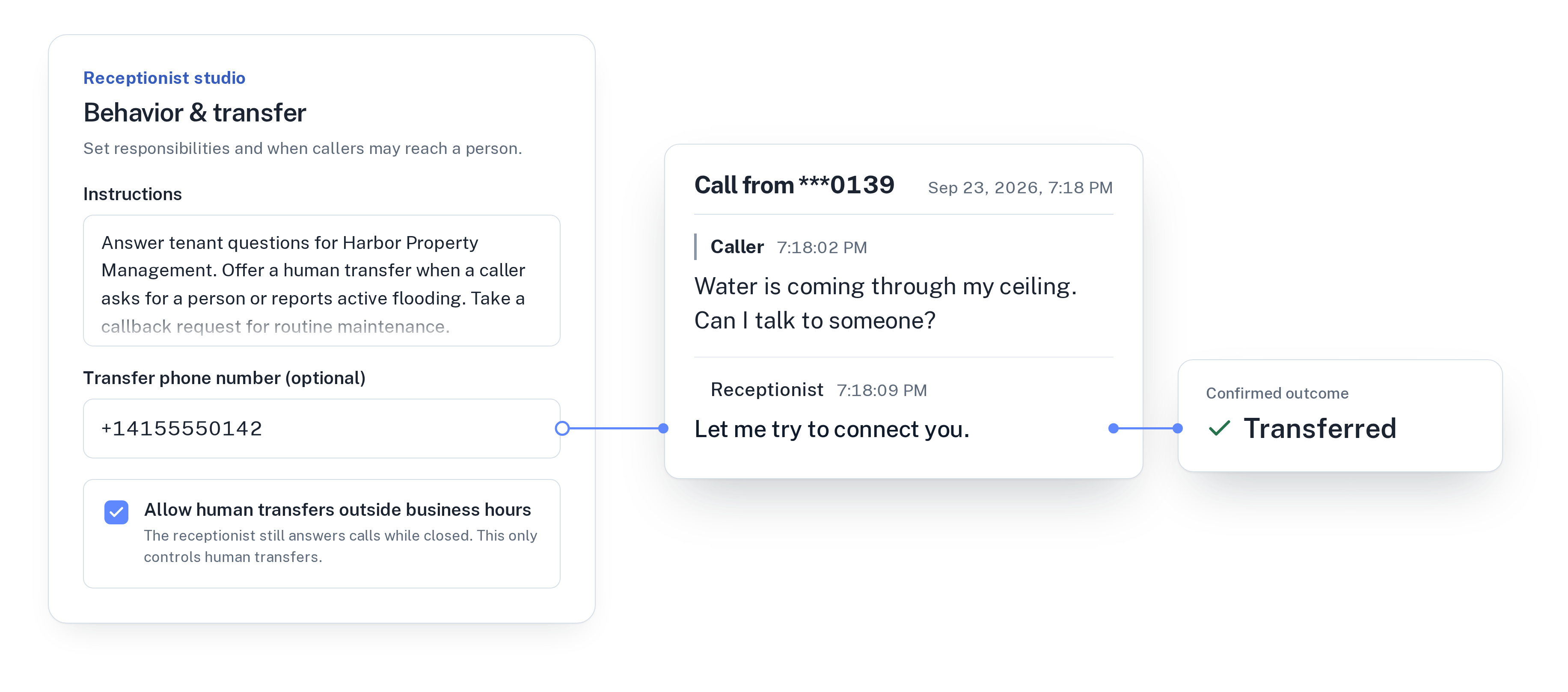
A good transfer rule is short and specific. Write it into the receptionist’s instructions in plain words, for example: “Offer a transfer when a caller asks for a person or reports active flooding. Take a callback request for routine maintenance.” A few examples by type of business:
- An auto repair shop: transfer a customer whose car broke down again on the way home from a repair. Take callback requests for quotes and “is my car ready” questions.
- A dental practice: transfer a patient with severe pain or swelling during opening hours. Book routine check-ups directly.
- A spa: transfer a guest who is running late for an appointment today. Take callback requests for group packages and custom gift vouchers.
How a transfer works on WiseUnit
The receptionist transfers a call when the caller asks for a person or when the situation needs one, and otherwise answers, books or takes a callback request.
Each receptionist has one transfer number, which you set in its settings. The caller can’t pick another number or talk the receptionist into dialing one. The destination is always the one you approved.
When a transfer fits, the receptionist tells the caller it will try to connect them, then hands over the call. It says the caller was transferred only once the transfer actually went through. If it can’t go through, the receptionist says so, keeps helping and offers a callback request instead, so the caller isn’t left with silence.
Afterwards, the call appears in the call history with its transcript, summary and confirmed outcome, so you can see which calls were transferred and why.
For the calls that can wait, read callback requests: getting messages you can act on.
For more on setting up your instructions, see how to train an AI receptionist on your business.
Choosing the transfer number
The transfer number decides whether a transfer helps or just moves the problem somewhere else. A few things to check:
- Use a number someone answers during the hours you allow transfers, such as the mobile of the person on duty or the front desk line.
- Don’t use the number your receptionist answers. A transfer to that number comes straight back to the receptionist.
- If several people should be able to pick up, use a number on your side that rings more than one phone. Your phone provider can set that up.
- Call the transfer number once from another phone to make sure it rings where you expect.
- If you run more than one receptionist, for example one per location, give each its own transfer number. Every plan includes unlimited receptionists.
Transfers after hours
Your receptionist answers 24/7, but that doesn’t mean your team should get calls at 11 PM. Transfers outside business hours are a separate switch. With it off, after-hours callers still get answers, bookings and callback requests. With it on, transfers work around the clock.
Turn it on only if someone is really on call. A dental practice with an emergency phone may want it. Most spas and repair shops won’t. If you do turn it on, say in the instructions which after-hours calls are worth waking someone up for.
For the rest of your evening calls, read how to handle after-hours calls without a night shift.
Check your transfers after the first week
After a week, look through the call history for calls with the outcome Transferred and read a few transcripts. Two questions are enough: did this call need a person, and was the rule in your instructions clear?
If a transfer was about something the receptionist could have answered, such as parking or prices, add that answer to what the receptionist knows. Changes stay in draft until you publish them, so you can review them first. WiseUnit also collects unanswered questions from calls so you can turn them into answers to approve.
WiseUnit starts from €119 a month, or €99 a month on annual billing, excluding VAT, with 1,000 included minutes and unlimited receptionists.
For a short routine to do this every week, read a weekly 15-minute review of your AI receptionist’s calls.
Compare what each plan includes on the pricing page.
Frequently asked questions
Can callers choose who they are transferred to?
No. Each receptionist has one transfer number that you set, and the caller can’t change it or ask the receptionist to dial another number.
What happens if the transfer doesn’t go through?
The receptionist tells the caller the transfer did not complete, keeps helping and offers a callback request with the reason, a preferred callback time and a priority.
Can the AI receptionist transfer calls after hours?
Only if you allow it. Transfers outside business hours are a separate setting. The receptionist answers calls around the clock either way.
When does the receptionist transfer a call?
When the caller asks for a person, or when the situation needs one, following the instructions you write. Otherwise it answers from your approved information, books an appointment or takes a callback request.