
A weekly 15-minute review of your AI receptionist’s calls
An AI receptionist gets better when someone looks at its calls. A short weekly routine to check outcomes, read the right transcripts and close the gaps in what it knows.
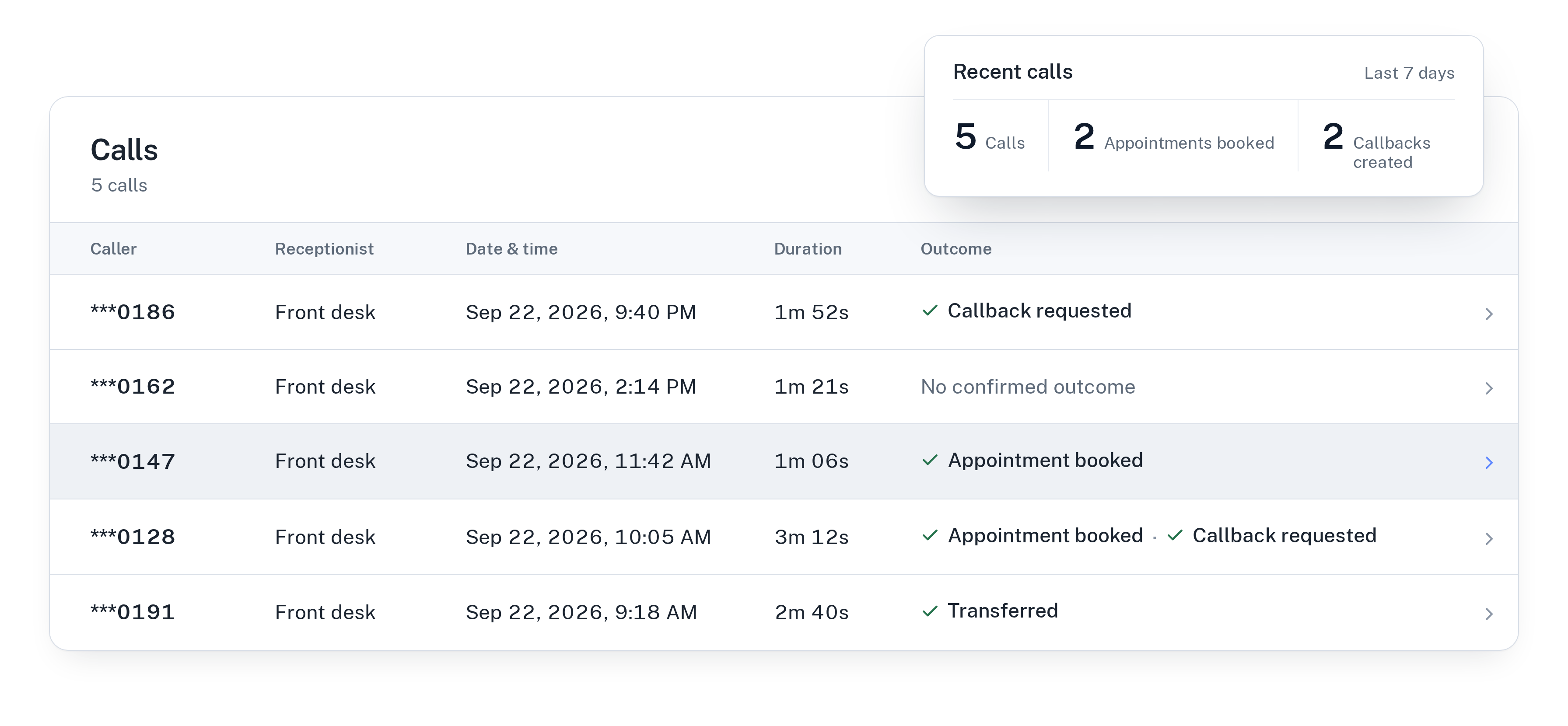
Why an AI receptionist needs a weekly look
Setting up an AI receptionist is not the end of the work. Your business changes: prices move, a new service starts, the holiday hours come around. Callers also ask things you never thought to write down.
A receptionist that answers only from what you approved can’t guess its way around those gaps, and that is a good thing. It means the fix is always the same: look at what callers asked, then add or correct what the receptionist knows. A short review once a week keeps that loop running without turning it into a project.
What you need before you start
Pick a fixed slot, such as Monday morning before the phones get busy, and one person who owns it. In WiseUnit everything you need is in one place:
- The call history, with a transcript, a summary and the confirmed outcome of every call.
- Call analytics, for the overall picture of the week.
- Unanswered questions, collected from calls where the receptionist didn’t have the answer.
- Your callback requests, each with a reason, a preferred callback time and a priority.
Minutes 1 to 3: look at the week as a whole
Start with call analytics and the call list. You are not reading individual calls yet. You are looking for anything that stands out: a day with far more calls than usual, more transfers than you expected, or a batch of calls without a confirmed outcome.
Note two or three things to check. That list decides which transcripts you read next, so you don’t spend the whole slot scrolling.
Minutes 4 to 8: read the calls that matter
You don’t need to read every transcript. Read the summaries first, and open the full transcript only for calls in these groups:
- Calls with no confirmed outcome. Find out why: did the caller hang up, ask for something you don’t offer, or get stuck on a question?
- Transfers. Check that each one really needed a person. If routine questions are being transferred, your description of urgent calls is probably too broad.
- Bookings that didn’t happen. If a caller wanted an appointment and the call ended without one, look at what got in the way.
- A few ordinary calls, picked at random, to hear how the receptionist sounds on a normal day.
Minutes 9 to 13: turn unanswered questions into answers
This is where the review pays off. Open the unanswered questions. Each one is something a real caller asked that the receptionist couldn’t answer from your approved facts, pages and documents.
For each question, decide: is this something callers should get an answer to? If yes, write the answer and approve it. If it is something only you can decide, such as a custom quote, leave it out and make sure those callers end up with a callback request instead.
Your changes stay in draft until you publish them. Review the draft once, then publish, so the receptionist uses the new answers from the next call on.
For more on writing good answers, read how to train an AI receptionist on your business.
Minutes 14 and 15: check the follow-ups
Finish with the callback requests. Every request from last week should be either done or scheduled. Sort by priority and look at the reasons: if the same reason keeps coming up, it might be a question the receptionist could answer itself next time.
Also check the transfer number. If the person behind it changed, or transfers after hours are no longer wanted, update the receptionist now rather than after a missed transfer.
When to look more often
In the first two weeks after going live, a short daily look is worth it, because that is when most gaps show up. The same goes for the week after a change: new prices, a new service, new opening hours or a new calendar.
If you run more than one receptionist, for example one per language or per location, review each one. They answer from their own setup, so a gap in one doesn’t show in the others. Every WiseUnit plan includes unlimited receptionists, from €119 a month or €99 a month on annual billing, excluding VAT.
See what each plan includes on the pricing page.
The weekly review on one page
Copy this into your calendar entry:
- Scan call analytics and the call list, and note what stands out.
- Read summaries, then transcripts for calls without an outcome, transfers and missed bookings.
- Turn unanswered questions into answers, approve them and publish the draft.
- Clear or schedule every callback request.
- Check that the transfer number and after-hours setting are still right.
Frequently asked questions
Do I have to read every call transcript?
No. Every call has a summary and a confirmed outcome, so you can skim the list and open full transcripts only for calls without an outcome, transfers and bookings that didn’t happen.
What happens to questions the receptionist couldn’t answer?
They show up as unanswered questions. You can turn each one into an answer and approve it. Changes stay in draft until you publish them.
Does the receptionist learn on its own from calls?
No. It answers only from the facts, website pages and documents you add and approve. The weekly review is how you decide what it should know next.