
Callback requests: getting messages you can act on
A phone message is only useful if you can act on it without calling twice. What a good callback request contains, how an AI receptionist takes one, and a simple routine to work through them.
Why most phone messages lead to phone tag
Most messages a business gets look the same: a name, a number and “please call me back”. Sometimes not even the name. You call back between two jobs, the caller is driving, you leave a voicemail, and the next round starts.
The problem is not that people leave messages. It is that the message leaves out everything you need to act on it. You don’t know what the call is about, so you can’t prepare. You don’t know when the caller is free, so you guess. And you don’t know which of five messages matters most, so you work through them in the order they came in.
Calls you miss while you are busy are a related problem, covered in how to stop losing callers when your phone is busy.
What a message you can act on contains
A useful message answers four questions before you pick up the phone. With all four, the callback becomes one call instead of three:
- Who called, and on which number to call back.
- Why they called, in a sentence specific enough to prepare an answer.
- When they would like to be called back.
- How urgent it is compared with everything else waiting.
How an AI receptionist takes a callback request
WiseUnit answers every call, 24/7, on the phone number you connect. It first tries to help the caller directly: it answers from the facts, website pages and documents you added and approved, and it can book an appointment into Google Calendar, Calendly or Cal.com, confirming only once the booking exists.
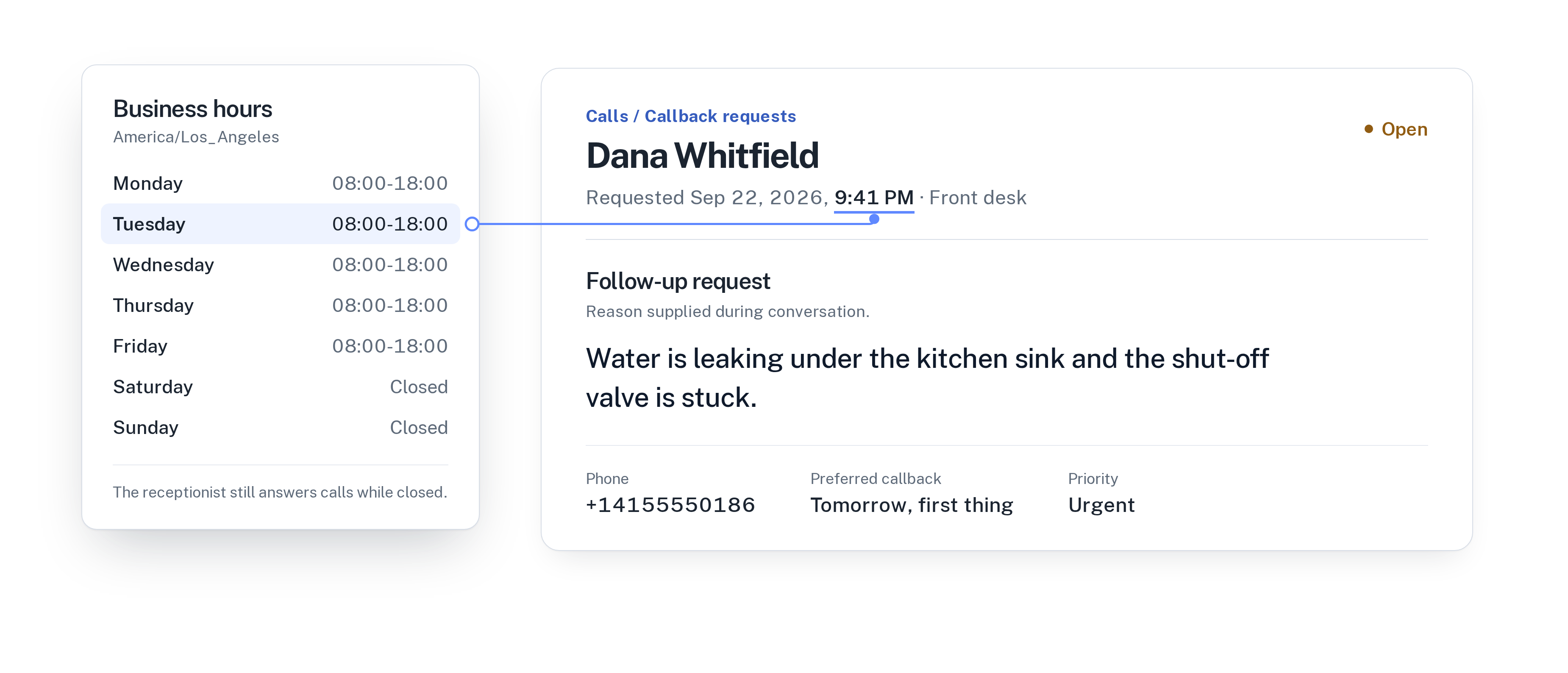
When the caller needs something only your team can give, it ends the call with a callback request instead of a vague message. The request holds the caller’s number and name, the reason in the caller’s own terms, the preferred callback time and a priority: urgent, high or normal.
Here is what that looks like in practice:
- An auto repair shop: a customer asks whether their car is ready. The receptionist doesn’t see your workshop system, so it takes a callback request: “Asking if the car dropped off Monday is ready, call back after 4 PM, normal priority.”
- A dental practice: a patient calls at 7 AM with tooth pain since last night. The request reads: “Toothache since yesterday evening, wants to be seen today, call back as soon as the practice opens, urgent.”
- A spa: a caller wants a gift voucher for a group of six with a custom package. The receptionist explains the packages you listed and takes a request for the custom part, with a preferred time of “weekday mornings”.
Where the requests land
Every callback request shows up in one list, sorted into open, in progress, resolved and dismissed. You can filter by receptionist and by priority, so a business with one receptionist per location or per language still sees what each one collected.
The call behind each request stays in the call history with its transcript, summary and confirmed outcome. If the reason is not enough, read the summary before you dial. Most of the time you won’t need to.
A daily routine to clear the list
Callback requests only help if someone owns them. Pick one person per day, and give them a fixed slot, for example the first 15 minutes after opening and once more after lunch.
- Filter for urgent first, then high, then normal.
- Mark a request as in progress when you pick it up, so nobody else calls the same person.
- Check the preferred callback time. If it is later today, schedule it rather than calling now.
- Add an internal note after the call: what you agreed, or that you left a voicemail. Notes are visible to your team.
- Mark the request as resolved once it is done, or dismiss it if it is a duplicate or no longer needed.
- If you see it differently, change the priority. Owners and admins can update status, priority and notes.
Fewer callbacks over time
Once a week, look at the reasons in last week’s resolved requests. If the same question keeps coming up, such as parking, a price or whether you offer a certain service, it probably doesn’t need a person. Add the answer to what your receptionist knows, approve it and publish. Changes stay in draft until you publish them.
WiseUnit also collects unanswered questions from calls, so you can turn them into answers to approve. Over a few weeks, the callback list gets shorter and the requests that remain are the ones that really need you.
For a step-by-step version of that weekly check, read a weekly 15-minute review of your AI receptionist’s calls.
When a callback is not the right outcome
A callback request is the right answer when the caller can wait. Two cases call for something else. If the caller wants an appointment, let the receptionist book it directly. If the matter needs a person right now, give the receptionist a transfer number. Each receptionist has one, and you can choose whether transfers are allowed after hours.
Everything else, the questions only you can answer, the quotes, the follow-ups, ends as a callback request with a reason, a time and a priority. Every WiseUnit plan includes unlimited receptionists, from €119 a month or €99 a month on annual billing, excluding VAT.
See what happens to calls after closing in how to handle after-hours calls without a night shift.
Compare what each plan includes on the pricing page.
Frequently asked questions
What does a callback request contain?
The caller’s name and number, the reason for the call, the preferred callback time and a priority: urgent, high or normal. The full call stays in the call history with its transcript and summary.
When does the AI receptionist take a callback request?
When the caller needs your team and the matter can wait. It first tries to answer from your approved facts, pages and documents, or to book an appointment.
Can my team track who is handling a callback?
Yes. Each request can be marked in progress, resolved or dismissed, and you can add internal notes that your team can see. Owners and admins can update requests.
Is a callback request the same as a voicemail?
No. A voicemail is a recording you have to listen to. A callback request is written down with a reason, a preferred time and a priority, and the call has a transcript.