
How to handle after-hours calls without a night shift
A practical way to handle the calls that come in after closing: what counts as urgent, what can be booked, and what should simply be waiting for your team in the morning.
Why after-hours calls matter
People call when the problem happens, not when you are open. A pipe leaks at 9 PM. A patient needs to move tomorrow’s appointment on a Sunday. A guest wants to know if you have a room for Friday while planning their trip in the evening.
If those calls reach voicemail, some callers leave a message and many simply call the next business on the list. The goal isn’t to staff the phone all night. It is to make sure every after-hours caller gets a useful response and the right ones reach a person.
Sort the calls into three kinds
Before choosing any tool, look at the calls you get outside business hours. Almost all of them fall into one of three groups:
- Urgent: the caller needs a person tonight. A burst pipe, a lock-out, a guest stuck at the door.
- Bookable: the caller wants an appointment, a visit or a reservation. Nobody needs to be woken up; the booking just needs to happen.
- Can wait: a question, a quote request or a problem that can be handled tomorrow, as long as nobody forgets.
The usual options, and where they fall short
Voicemail treats all three groups the same: everyone waits. Forwarding the line to someone’s mobile treats them all as urgent, which burns people out and still misses calls when they sleep. An on-call rota helps with urgent calls but does nothing for bookings. A human answering service can take messages, but usually can’t book or answer questions about your business.
What you actually want is a different response for each group, decided by rules you set once.
Setting it up with an AI receptionist
Here is how that looks in WiseUnit, which answers every call around the clock.
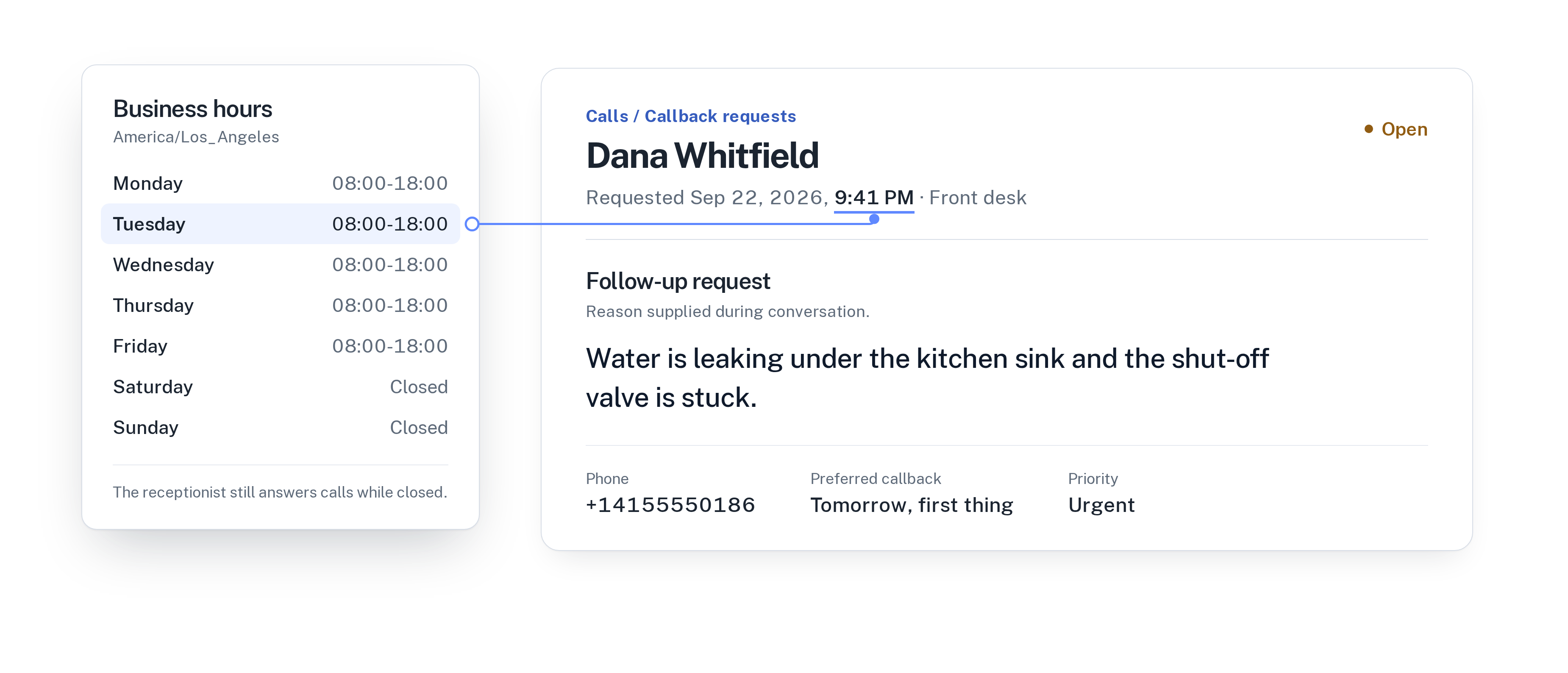
- Set your business hours. The receptionist still answers when you’re closed; the hours decide what happens next.
- Describe what counts as urgent in the receptionist’s instructions, in your own words: for example, active water leaks, no heating in winter, or a guest who can’t get in.
- Add a transfer number and allow transfers outside business hours if someone is on call. Urgent callers are put through; nobody else is.
- Connect your calendar so bookable calls end with an appointment, confirmed only once the booking exists.
- Everything else becomes a callback request with the caller’s reason, the time that suits them and a priority.
The morning after
The difference shows up at 8 AM. Instead of a voicemail inbox to listen through, your team opens one list of callbacks sorted by priority, next to a call history where every call has a transcript and a confirmed outcome: appointment booked, transferred, callback requested.
The urgent 9:41 PM leak is at the top with the note “callback tomorrow, first thing”. The appointments made overnight are already in the calendar. Nobody has to reconstruct what happened.
If you are weighing this against other options, read AI receptionist vs. answering service vs. voicemail.
A short checklist
Before you switch it on, make sure you have:
- Written down what counts as urgent for your business.
- Decided who takes urgent calls after hours, and on which number.
- Connected the calendar that after-hours bookings should go into.
- Added the facts callers ask about most, such as opening hours, prices and how to reach you.
- Agreed who works through the callback list each morning.
Frequently asked questions
Will someone be woken up for every call?
No. Calls are only transferred after hours if you allow it and the situation matches what you described as urgent. Everything else is booked or recorded as a callback request.
Can after-hours callers still book appointments?
Yes. With Google Calendar, Calendly or Cal.com connected, the receptionist books during the call and confirms only once the calendar has the booking.
What about callers who speak another language?
Each WiseUnit receptionist answers in one language. If you serve callers in several languages, run a receptionist for each; every plan includes unlimited receptionists.