
The lunch-hour gap: who answers your phone between 12 and 2
Why the middle of the day is the hardest time to answer the phone, how to count the calls you miss between 12 and 2, and how an AI receptionist covers them with bookings, answers and callback requests.
Your lunch break is their lunch break
People with a job call a dentist, a garage or a salon when they have a few free minutes. For many of them that is the middle of the day, when they step away from their own work.
That is the same window in which a small team steps away from the phone. The front desk goes to eat, the owner is finishing a morning job that ran over, and the one person left is with a customer. Nobody did anything wrong. The two breaks simply overlap.
The result is a gap that repeats every working day. It is short, it is predictable, and because it is predictable you can fix it once.
How small teams usually cover it
Most businesses use one of three workarounds, and each has a cost.
- Voicemail. Callers who want an appointment today often hang up without leaving a message, and you never learn why they called.
- A lunch rota. Someone eats at the desk and answers between bites, which means they don’t get a real break and the caller gets half their attention.
- Closing the line. A recorded message says you are back at 2, and the caller has to remember to try again during their own working afternoon.
Count your own midday calls first
Before you change anything, look at your own numbers. General figures about missed calls describe other businesses, not yours.
Open the call log of your phone system or your mobile and take the last two full working weeks. Count the calls that came in between 12 and 2, then count how many of them nobody answered. Note how many of those callers left a message and how many you managed to reach when you called back.
If the unanswered count is close to zero, your current setup works and you can stop here. If it is several calls a day, you now know the size of the gap and can judge any fix against it.
To turn that count into money, use the four steps in what a missed call costs your business.
What an AI receptionist does while you eat
An AI receptionist answers your business number at every hour, so the midday gap is covered the same way as an evening or a Sunday. In WiseUnit, a lunch-hour call goes like this.
- The receptionist answers straight away with the greeting you wrote.
- Questions about opening hours, prices, parking or what to bring are answered from the facts, website pages and documents you added and approved.
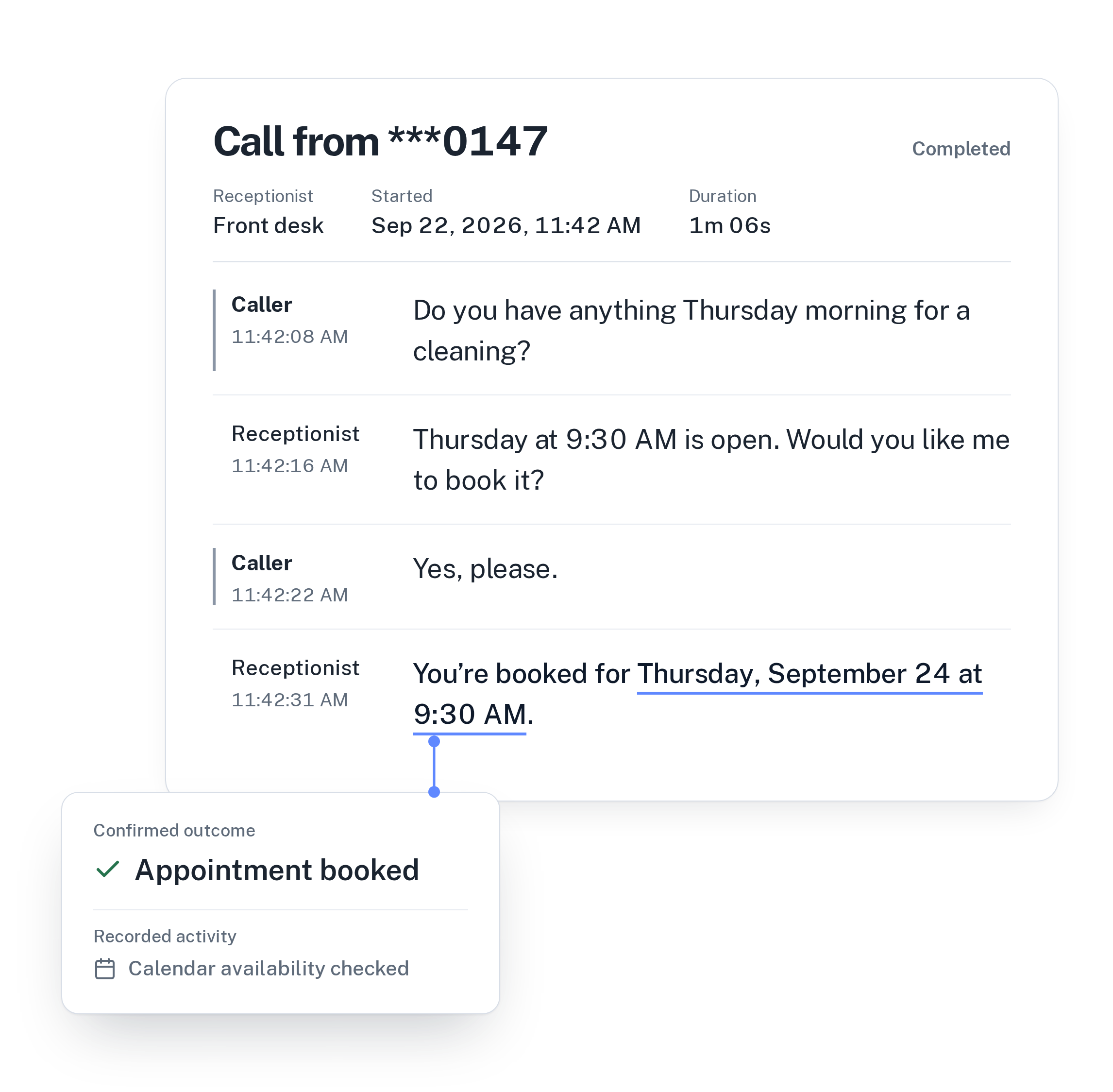
- If the caller wants an appointment, it checks your Google Calendar, Calendly or Cal.com, offers a free slot and confirms only once the booking exists.
- If the caller needs a person, it records a callback request with the reason, the preferred callback time and a priority.
- If the situation is one you described as urgent, it transfers the call to your transfer number.
- The transcript and the confirmed outcome are saved in your call history.
Set it up before your next lunch
Lunch calls are mostly short and practical, so the setup is too.
- Write down the five questions callers ask most at midday and add the answers as facts. Opening hours, prices for your common services and how to find you usually cover it.
- Connect your calendar and block your own lunch, so the receptionist only offers times you can keep.
- Describe in the instructions which calls may interrupt you, for example a patient in pain or a customer stranded with a car that won’t start. Everything else becomes a callback request.
- Ask for the preferred callback time in every request. Someone calling on their lunch break often can’t pick up at 3 PM.
- Publish. Changes stay in draft until you do, so nothing reaches callers half finished.
The ten minutes after lunch
When you are back, open the call history. Appointments booked over lunch are already in your calendar and need nothing from you.
Work through the callback requests by priority and call each person at the time they asked for. You already know the reason for the call, so the conversation starts in the middle instead of from zero.
Then look at the unanswered questions. Each one is something a caller asked that your information didn’t cover. Approve an answer and the next caller who asks at 12:30 gets it on the spot.
You can see how each of these steps works on the AI Receptionist page, or compare plans on the pricing page.
Frequently asked questions
Can I use the receptionist only during lunch?
WiseUnit answers every call on the number you connect, 24 hours a day. Lunch is often where a team first notices the difference, and the same setup then covers evenings, weekends and busy mornings.
Will it interrupt my lunch with transfers?
Only for the situations you describe in the instructions. Each receptionist has one transfer number, and every other call that needs a person becomes a callback request with a reason, a preferred time and a priority.
Can callers book an appointment while everyone is out?
Yes. With Google Calendar, Calendly or Cal.com connected, the receptionist books into your free slots during the call and confirms only once the booking exists. Calendly needs a paid Calendly plan, and Calendly and Cal.com need the caller’s email.
How much does it cost?
WiseUnit starts from €119 a month excluding VAT, or €99 a month on annual billing, with 1,000 included minutes on the Starter plan. Every plan includes unlimited receptionists.