
How to stop losing callers when your phone is busy
Most missed calls come in while you are already busy: with a customer, on another call or on a job. A practical way to make sure every one of those callers still gets an answer.
The calls you miss are mostly daytime calls
When people think about missed calls, they picture the phone ringing in an empty office at night. For most small businesses, the bigger gap is during the day. The phone rings while you are with a customer, already on another call, under a sink, driving between jobs or in the middle of a treatment.
You are open, you are working, and you still can’t pick up. The caller doesn’t know that. They hear the phone ring out or reach voicemail, and they decide what to do next.
What a busy-hour caller actually does
Some callers leave a message. Many don’t. A new customer looking for a plumber, a dentist or a table for Friday usually has a list of options open on their phone, and calling the next one takes a few seconds.
The messages you do get are often thin: a name, a number, “call me back”. You return the call between two jobs, reach their voicemail, and the game of phone tag begins. Meanwhile the simple question they had, such as your opening hours or whether you do a certain service, could have been answered in the first call.
What callers need when you can’t pick up
Look at the calls you missed last week. Most of them wanted one of four things:
- An answer to a simple question: opening hours, prices, location, whether you offer a service.
- An appointment, a visit or a reservation.
- A person, because the matter is urgent or only you can decide it.
- A callback, at a time that suits them, from someone who already knows why they called.
Answering while you work, with an AI receptionist
An AI receptionist covers all four without you stepping away from what you are doing. In WiseUnit, the receptionist answers every call on the phone number you connect, around the clock, including the hours you are open but busy.
- Questions: add facts, website pages and documents about your business and approve them. The receptionist answers from what you approved.
- Bookings: connect Google Calendar, Calendly or Cal.com. The receptionist books during the call and confirms only once the booking exists in your calendar.
- Urgent calls: add a transfer number and describe what counts as urgent. Those callers are put through to a person; everyone else is not.
- Everything else: the call ends with a callback request that holds the caller’s reason, the time that suits them and a priority.
Catching up between jobs
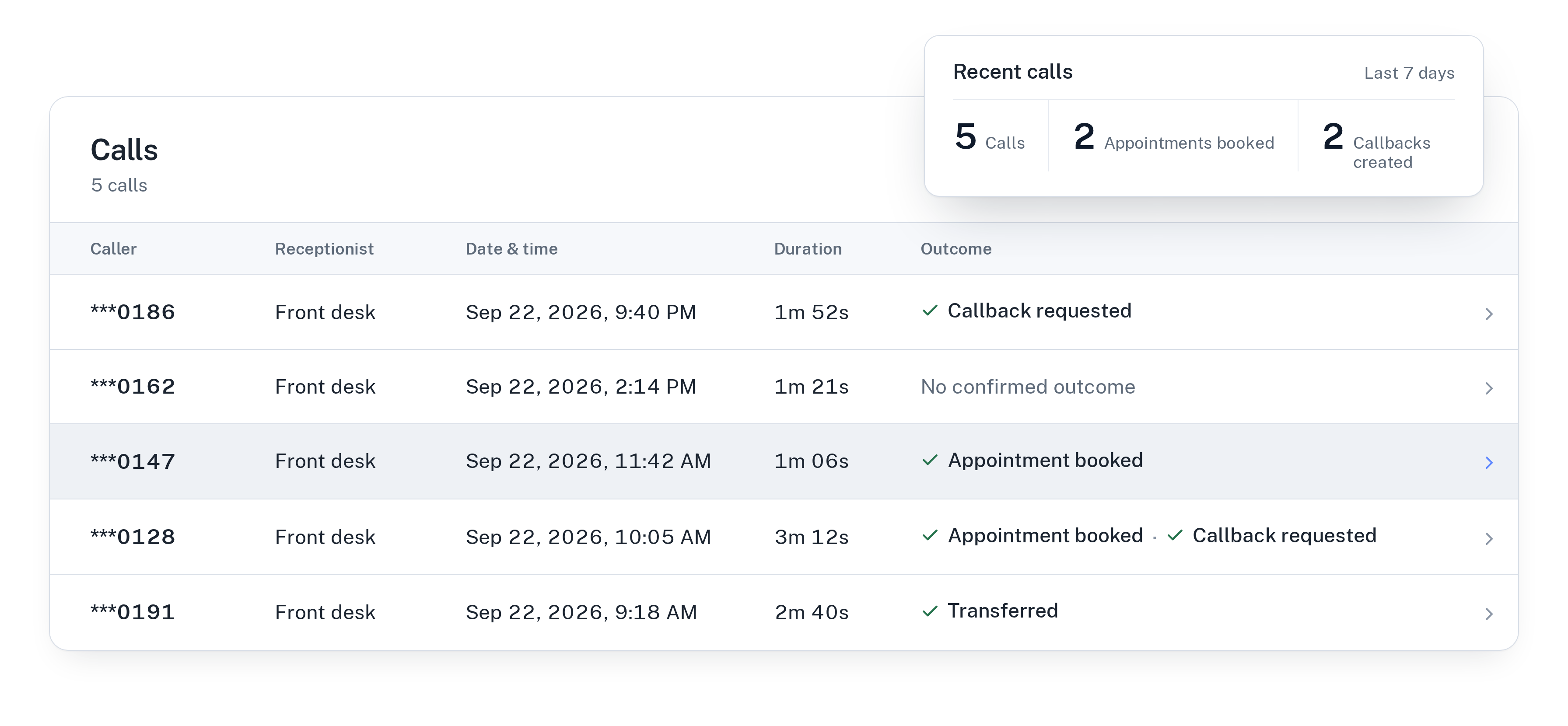
When you have a free minute, open the call history instead of a voicemail inbox. Every call has a transcript, a summary and a confirmed outcome: appointment booked, transferred, callback requested. You can see at a glance which callers are already handled and which ones are waiting for you, sorted by priority.
Calls also show you what is missing. When callers ask something your receptionist couldn’t answer, those questions appear as unanswered questions, and you can turn each one into an answer to approve. Your changes stay in draft until you publish them, so nothing goes live by accident.
For more on giving the receptionist the right facts, read how to train an AI receptionist on your business.
What it costs
WiseUnit starts from €119 a month, or €99 a month on annual billing, excluding VAT. The Starter plan includes 1,000 minutes of calls. Business includes 3,500 minutes and Scale 7,000. Every plan includes unlimited receptionists, so you can run one per language or per location without paying per seat.
See the full breakdown on the pricing page.
A short checklist
Before you switch it on, make sure you have:
- Listed the questions callers ask most and added the answers as facts.
- Connected the calendar that bookings should go into.
- Decided which calls need a person, and on which transfer number.
- Agreed who works through the callback list, and when during the day.
- Picked the language your callers speak. Each receptionist answers in one language: English, German, Italian, French, Spanish, Polish or Turkish.
Frequently asked questions
Can callers book an appointment while I’m busy?
Yes. With Google Calendar, Calendly or Cal.com connected, the receptionist books during the call and confirms only once the booking is in your calendar. Calendly needs a paid Calendly plan, and Calendly and Cal.com bookings need the caller’s email.
What happens when a caller really needs me?
If the call matches what you described as urgent, the receptionist transfers it to your transfer number. Otherwise it takes a callback request with the reason, the caller’s preferred time and a priority.
What if the receptionist doesn’t know the answer?
It answers only from the facts, pages and documents you approved. Questions it couldn’t answer show up as unanswered questions, which you can turn into answers to approve, and the caller can still leave a callback request.