
Changing prices and hours without confusing callers
How to keep your AI receptionist’s answers current when prices, opening hours or services change: where each answer lives, how to prepare the change in draft, when to publish and what to check afterwards.
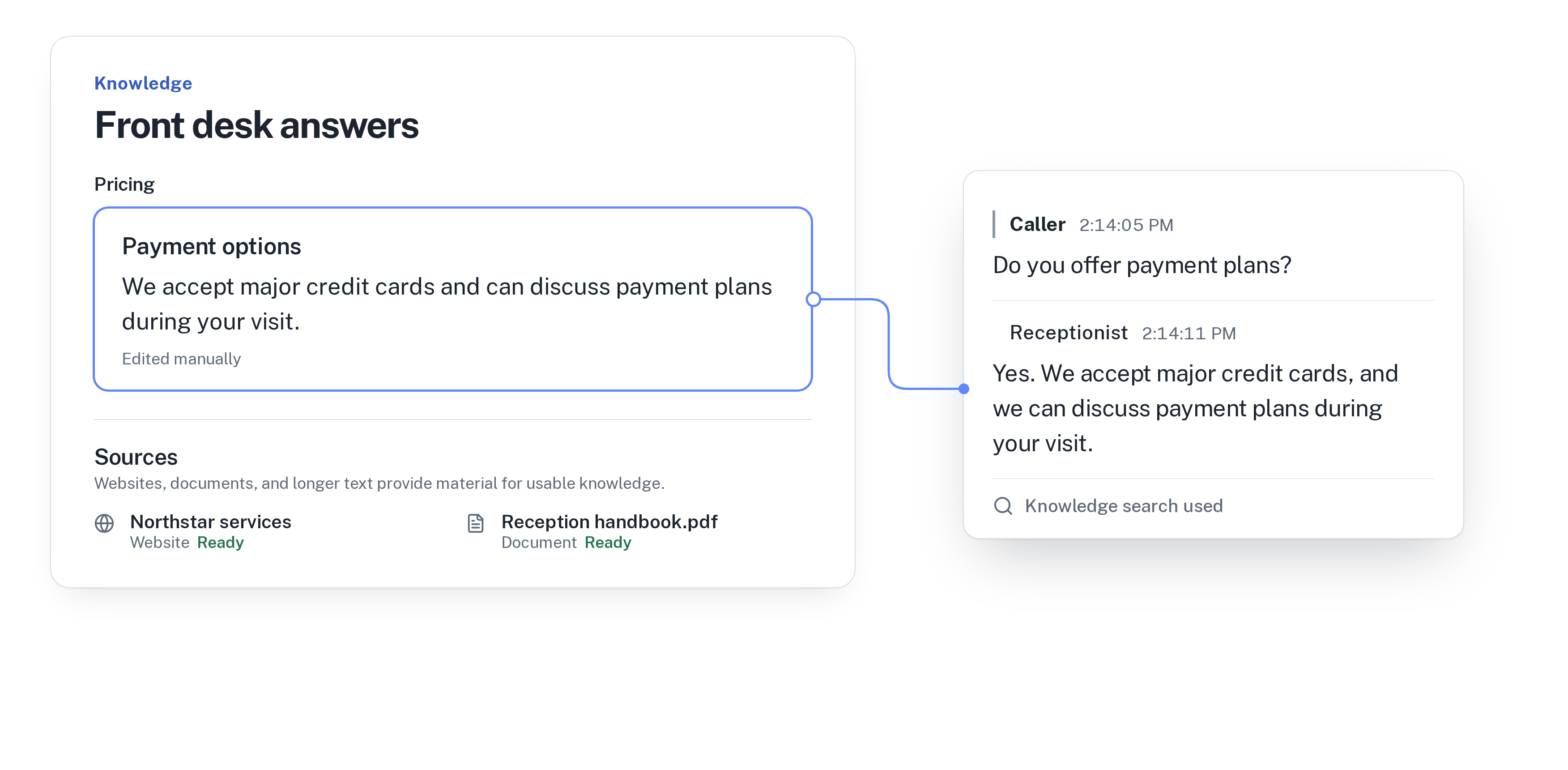
An old answer causes a second problem
Prices change at the start of the year. Opening hours change with the season. A service is added, another one is dropped. In a small business these changes are decided quickly, and the phone is easy to forget.
When the phone still gives the old answer, the problem doesn’t end with the call. A customer books a service you no longer offer, turns up at 5:30 on a Saturday when you now close at 4, or expects last year’s price at the counter. Someone then has to explain, and the customer leaves less happy than if they had been told the right thing on the phone.
An AI receptionist answers from what you give it, so it stays current as long as what you give it is current. That makes the update a short routine instead of a risk.
Find every place the old answer lives
Before you change anything, list where the receptionist could find the old price or the old hours. In WiseUnit there are usually four places:
- Facts: the short answers you add and approve, such as “Oil change: $89” or “Open Saturday 9 to 4”.
- Website pages you added: if your price page still shows the old numbers, the receptionist can find them there too.
- Documents you added, such as a price list or a handbook in PDF.
- Your business hours and your calendar: the hours tell the receptionist when you are open, and the calendar decides which times callers can book.
Prepare the change in draft
In WiseUnit, changes stay in draft until you publish them. Callers keep hearing the current answers while you prepare the new ones, so you can do this a week ahead without anything going out early.
Change the facts first. Edit the existing fact rather than adding a second one next to it, so there is never an old price and a new price side by side. If the website page or document you added still shows the old numbers, update the page or replace the document with the new version. Then adjust your business hours, and block or open the matching times in Google Calendar, Calendly or Cal.com, whichever calendar the receptionist books into.
If you want callers to know about a change before it starts, say so in a fact: “From January 1, a full service costs $189.” Callers who ask about that service then hear both the current price and the date it changes.
Test it, then publish on the right day
Make a test call and ask the questions customers actually ask: “How much is a cut and color?”, “Are you open Saturday afternoon?”, “Can I book for next Friday at 5?” Listen for the new numbers and the new hours, and check that the times offered for booking match the calendar.
Publish on the day the change starts, not the day you prepared it. If the new prices apply from January 1, publish on the morning of January 1, or the evening before if you are closed. Put a reminder in your calendar so it doesn’t depend on memory.
Check the first calls after the change
For the first few days, look at the call history. Every call has a transcript, a summary and a confirmed outcome, so you can read how the receptionist answered questions about price and hours without listening to every call.
Look at the unanswered questions as well. A change often brings new questions: “Is the old price still valid for my booking?” or “Why did you stop opening on Mondays?” WiseUnit collects the questions the receptionist couldn’t answer and turns them into suggested answers for you to approve. Approve the ones that are right, edit the others, and publish again.
This fits well into a short weekly routine. Read how to review your AI receptionist’s calls in 15 minutes a week.
Checklist for every price or hours change
Before the new prices or hours start, check that you have:
- Edited the existing facts instead of adding new ones next to them.
- Updated the website pages and documents you added, or replaced them with current versions.
- Changed your business hours and the matching times in your calendar.
- Added a fact about the change if callers should hear about it in advance.
- Made a test call with the questions customers really ask.
- Published on the day the change starts, with a reminder in your calendar.
- Planned a look at the call history and unanswered questions a few days later.
Frequently asked questions
Do callers hear my new prices before I publish?
No. Changes stay in draft until you publish them, so callers keep hearing the current answers while you prepare the new ones.
What if my website still shows the old prices?
If you added that page to the receptionist, update the page or the document with the current version, and keep the facts and the website consistent so callers never get two different numbers.
What does it cost?
WiseUnit starts from €119 a month, or €99 a month on annual billing, excluding VAT, with 1,000 minutes included. Every plan includes unlimited receptionists.