
“Is my car ready?” Handling status calls at your auto shop
How an auto shop can handle “is my car ready?” calls with an AI receptionist: what it can answer from your facts, what it can’t, how to write callback rules for status calls and how to get fewer of them.
Why status calls pile up
Every car in your bays has an owner waiting for it. Some need it for work tomorrow, some are borrowing a car from a relative, and most of them would like to know when to come by. So they call. Often more than once.
Each of these calls is short, but each one means stopping, finding the job, walking to the bay or asking the technician, and calling back. On a busy day your service advisor spends a large part of the morning answering the same question for different cars, while new customers who want to book work wait on hold or hang up.
An AI receptionist doesn’t make the work go faster. What it changes is how the calls reach you: the general questions get answered straight away, and the questions about one specific car arrive as callback requests with everything your advisor needs.
What the receptionist can answer on its own
WiseUnit answers every call on your shop’s number, 24 hours a day, using the facts, website pages and documents you add and approve. Plenty of the questions behind a status call are general, so it can answer them directly.
- “When can I pick up my car?” Your opening hours, the last pickup time and whether there is an after-hours key drop.
- “How long does a brake job usually take?” The typical times you give it for common work, with your own wording about why a job can take longer.
- “How do I pay?” The payment methods you accept and whether payment is due at pickup.
- “Will you call me when it’s done?” How your shop lets customers know a car is ready, in the words you use at the counter.
- “Do you have a loaner car?” Your loaner or shuttle policy, if you have one.
What it can’t answer, and what it does instead
WiseUnit doesn’t look into your shop management system, so it doesn’t know whether a specific car is on the lift, waiting for a part or ready to go. It won’t guess. When a caller asks about their own car, the receptionist says that the shop will check and call back, and records a callback request.
That request includes the reason, the caller’s preferred callback time and a priority. Tell the receptionist which details to collect for status calls, such as the name, the plate number or the make and model, so your advisor can find the job without calling twice.
Some status calls shouldn’t wait. A customer standing at your door, a car that broke down again after pickup or someone who can’t get to work without their car may need a person now. Each receptionist has one transfer number, and your instructions say which situations are put through.
To decide which calls should reach a person, read when your AI receptionist should hand a call to a person.
Write callback rules for status calls
A list of twenty callback requests is only useful if the order makes sense. Give the receptionist simple rules for status calls, in plain language:
Then pick two fixed moments a day, for example late morning and mid-afternoon, to work through the list from the top. For more on writing these rules, see callback requests: getting messages you can act on.
- High priority when the caller needs the car today or has a pickup time we already agreed.
- Normal priority for general “how is it going” questions.
- Always ask for the plate number or make and model, and a callback time that suits the caller.
- If the caller mentions a new problem with the car, write it down in the reason.
Get fewer status calls in the first place
Many status calls happen because the customer doesn’t know when to expect news. A clear promise at drop-off does more than any phone setup: tell them when they will hear from you, and keep to it.
Then add the same promise to the receptionist’s facts, for example: “We call every customer once the diagnosis is done and again when the car is ready.” Callers hear the same thing at the counter and on the phone, and some of them will wait for your call instead of asking again.
Changes stay in draft until you publish them, so you can test new wording with a call to your own number before customers hear it.
Check the week’s calls
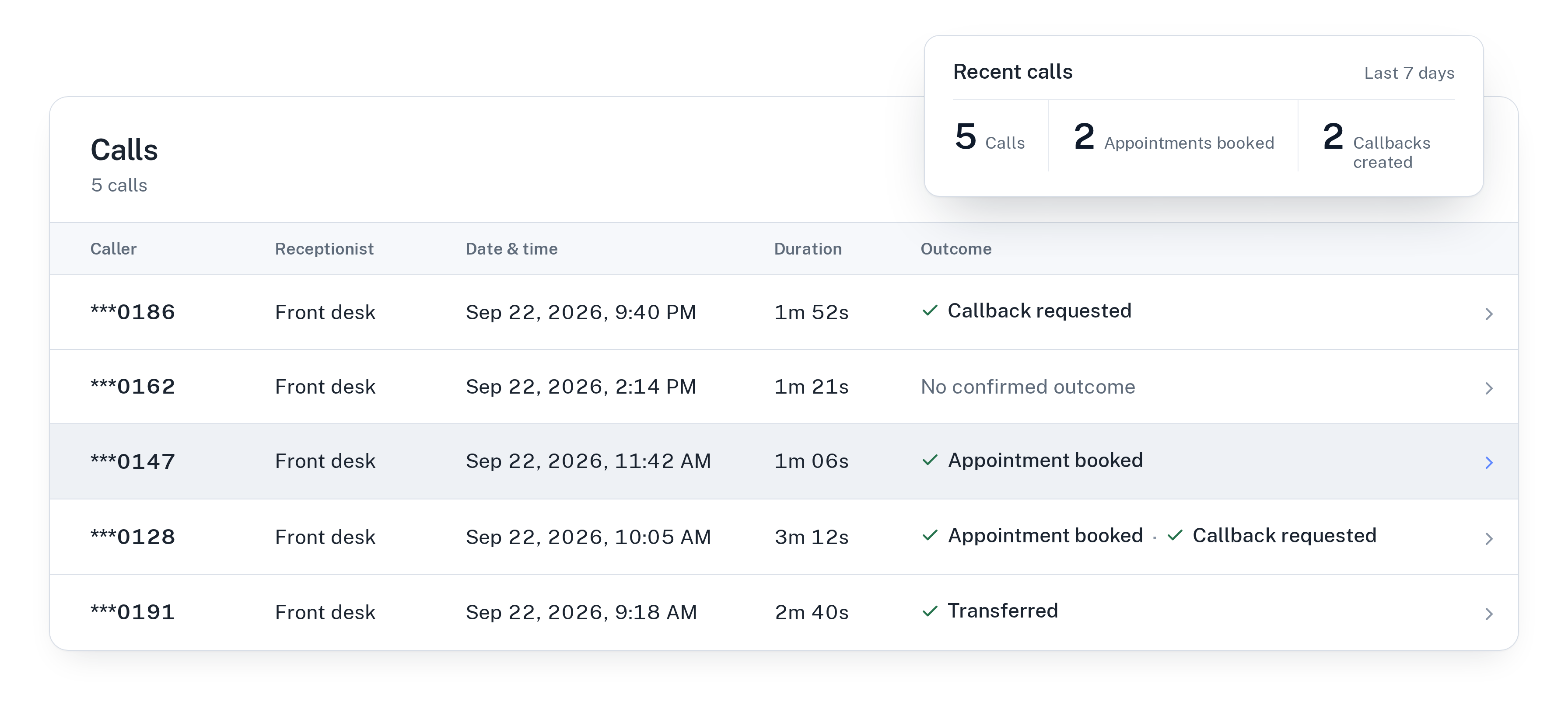
Every call is saved in your call history with a transcript, a summary and a confirmed outcome, such as “Callback requested” or “Appointment booked”. Call analytics show how many calls came in and how they ended.
The list of unanswered questions shows what callers asked that your knowledge didn’t cover. If several people asked whether you work on Saturdays or how long a timing belt takes, approve an answer once and the receptionist uses it on every call after that.
Meanwhile, the calls that matter most still get through: new customers who want to book work can do it during the call, because the receptionist books into Google Calendar, Calendly or Cal.com and confirms only once the booking exists.
Getting started
Connect a phone number, add your hours, pickup rules, payment methods and typical repair times, connect your calendar, set the transfer number and publish. Then call your own shop and ask whether your car is ready.
WiseUnit plans start at €119 a month excluding VAT, or €99 a month on annual billing, with 1,000 included minutes on Starter. Business costs €359 a month, or €299 on annual billing, with 3,500 minutes. Every plan includes unlimited receptionists.
See how it works for garages and dealerships on the automotive page, or compare plans on the pricing page.
Frequently asked questions
Can the AI receptionist tell a customer whether their car is ready?
No. WiseUnit does not look up jobs in your shop management system. It answers general questions such as pickup times from your facts and records a callback request with the caller’s details, or transfers the call if your instructions say so.
What details does it collect on a status call?
The reason for the call, the caller’s preferred callback time and a priority, plus the details you ask for in your instructions, such as the name and the plate number or make and model.
Can a customer who is waiting at the shop reach a person?
Yes, if you set it up that way. Each receptionist has one transfer number, and your instructions decide which situations are put through to it.
How much does it cost?
Plans start at €119 a month excluding VAT, or €99 a month on annual billing, with 1,000 included minutes on Starter and unlimited receptionists on every plan.