
How an AI receptionist answers calls for plumbers, electricians and HVAC
What an AI receptionist does on calls to a plumbing, electrical or HVAC business, what to teach it, which calls still reach a person and how to set it up.
Why trades miss so many calls
In a plumbing, electrical or HVAC business, the people who could answer the phone are usually on a job. One is under a sink, one is in a crawl space, and the owner is driving between appointments or quoting a job in someone’s kitchen. The office, if there is one, closes at five.
The calls you miss are a mix. Some are urgent: water coming through a ceiling, no heat on a cold night, a breaker that keeps tripping. Most are routine: someone wants an estimate for a new water heater, asks whether you service their area or wants to know what a service call costs. Either way, a caller who reaches voicemail often calls the next company on the list.
An AI receptionist answers those calls on your number, puts the urgent ones through to the person on call, books estimate and service visits that fit your calendar and writes down the rest so you can call back with the details in front of you.
What happens when a customer calls
Here is how a typical call runs in WiseUnit.
- The receptionist answers immediately with the greeting you wrote, for example your company name and what it can help with.
- It asks the questions you set: the caller’s name, the address or area, what the problem is and whether it is happening right now.
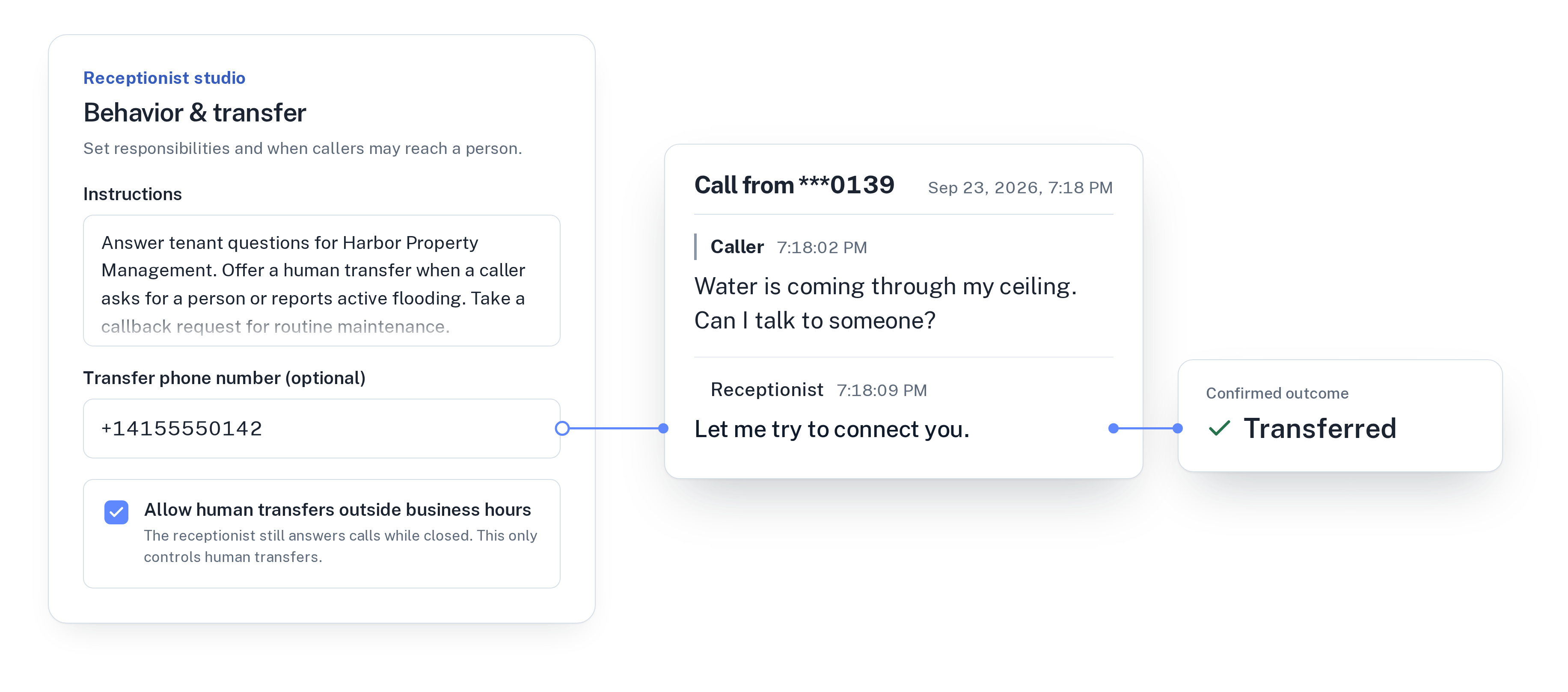
- If the caller describes something you marked as urgent, it offers to connect them to your transfer number, such as the phone your on-call technician carries.
- If it is a question your knowledge covers (service area, hours, call-out fee, the brands you work on, whether you do estimates), it answers with the wording you approved.
- If the caller wants a visit, it checks your calendar during the call, offers an open slot and books it. It tells the caller the visit is booked only once the calendar has it.
- Anything else becomes a callback request with the reason, the preferred callback time and a priority. The transcript and the outcome are saved in your call history.
Deciding what counts as urgent
You write the rule, in plain words, in the receptionist’s instructions. A plumber might list active leaks, flooding and no water. An electrician might list sparking outlets, burning smells and a total loss of power. An HVAC company might list no heat in winter and no cooling during a heat wave.
Each receptionist has one transfer number. Point it at the phone of whoever is on call, and allow transfers outside business hours if someone is available to take them at night or on weekends. If nobody picks up, the call is not lost: it ends with a callback request marked high priority.
Some situations need a different first step. If you want callers who smell gas to hear your safety wording before anything else, add that wording as an approved fact and tell the receptionist when to say it.
For more on setting the rule, read when your AI receptionist should hand a call to a person.
What to teach it about your business
The receptionist answers from the facts, website pages and documents you add and approve. If your services page and service area are already on your website, add those pages instead of typing them again. These are the things callers ask most.
- The work you do and the work you don’t, for example “We install and repair water heaters, but we don’t do septic systems.”
- Your service area, listed by town or ZIP code.
- Your call-out or diagnostic fee, if you are happy to quote it, and a clear line for everything else, such as “We give a price after we have seen the job.”
- Opening hours, and what happens after hours.
- The brands and systems you work on, and whether you offer maintenance plans.
- What the customer should do before you arrive, such as turning off the water at the main valve.
Booking estimates and service visits
WiseUnit books into Google Calendar, Calendly or Cal.com. With Calendly you need a paid Calendly plan, and with Calendly or Cal.com the receptionist asks the caller for an email address, because the booking needs one.
The receptionist offers the open slots your calendar shows, so set the calendar up with the visits you are happy to have booked by phone, for example a one-hour estimate window or an annual furnace service. Larger projects that need a conversation first, such as a full rewire or a new HVAC system, are better left as a callback for you.
It books new visits. It does not move or cancel existing ones, and it doesn’t look into your job management software, so “When is my technician arriving?” or “Can we move Thursday?” is transferred or turned into a callback with the caller’s name and question.
Calls after hours and on busy days
Many calls come in the evening, when customers get home and find the problem. The receptionist answers every call 24/7, so a call at 9 PM gets the same questions, bookings and callback requests as a call at 9 AM.
On busy days the receptionist takes the calls you can’t, while you finish the job in front of you. Afterwards, the call history shows each call with its transcript and confirmed outcome, and the list of unanswered questions shows what callers asked that your knowledge doesn’t cover yet. Approve an answer once and it is used on every call after that.
Changes stay in draft until you publish them, so a new call-out fee or a change to your service area reaches callers only after you approve it. If your customers call in more than one language, you can run a receptionist for each, since every plan includes unlimited receptionists.
For after-hours calls in general, see how to handle after-hours calls without a night shift.
Getting started
Connect a phone number, add your services, service area, fees and hours, write your urgent-call rule, set the transfer number to your on-call phone, connect your calendar and publish. Then call yourself twice: once to book an estimate and once as a customer with water coming through the ceiling.
WiseUnit plans start at €119 a month excluding VAT, or €99 a month on annual billing, with 1,000 included minutes on Starter.
See how it works for your trade on the home services page, or compare plans on the pricing page.
Frequently asked questions
Can the AI receptionist send urgent calls to my on-call technician?
Yes. You describe which calls are urgent in the instructions and set one transfer number per receptionist, such as your on-call phone. Transfers can be allowed outside business hours. If nobody answers, the call ends with a high-priority callback request.
Can it give customers a price for a job?
It can quote the prices you approved, such as a call-out or diagnostic fee. For work that depends on the job, it says what you told it to say, for example that you give a price after seeing the job, and takes a callback request.
Can it tell a customer when the technician will arrive?
No. WiseUnit doesn’t look into your job management or dispatch software. Those calls are transferred to your team or recorded as a callback with the caller’s name and question.
How much does it cost for a plumbing, electrical or HVAC business?
Plans start at €119 a month excluding VAT, or €99 a month on annual billing, with 1,000 included minutes on Starter and unlimited receptionists on every plan.