
An AI receptionist for a one-person business: a one-hour setup
A practical setup for owners who are the whole business: what to add in the first hour, when a call should reach your own mobile, and how to catch up at the end of the day.
When you are the business, every call interrupts something
If you work alone, you are the mechanic, the receptionist and the bookkeeper. The phone rings while you are under a car, halfway through a facial or with a patient in the chair. You can stop and answer, which costs you the job in front of you, or you can let it ring, which may cost you the caller.
Most solo owners end up doing both. They answer some calls with dirty hands, let the rest go to voicemail and return calls in the evening. The people who left a message often don’t pick up then, and the ones who didn’t leave a message have usually booked somewhere else.
An AI receptionist doesn’t add a person to your business. It takes the calls you can’t, and it follows rules you write once, so you only hear about the calls that need you.
What it does while your hands are busy
In WiseUnit, the receptionist answers every call on the phone number you connect, 24/7. On each call it does one of four things:
- Answers questions about your hours, prices, address and services from the facts you approved.
- Books an appointment into your Google Calendar, Calendly or Cal.com, and confirms only once the booking exists.
- Transfers the caller to your mobile, but only in the situations you described.
- Takes a callback request with the reason, the time that suits the caller and a priority.
Your one-hour setup
You don’t need a free afternoon. Split one hour into four blocks of fifteen minutes.
If you want to go through every setting in more detail, use the AI receptionist setup checklist.
- Minutes 1 to 15, facts: your opening hours, address, parking, the services you offer, your prices or price ranges, how customers pay and what you don’t do. Callers who ask for something you don’t offer should hear that clearly.
- Minutes 16 to 30, calendar: connect the calendar you already use and keep it honest. Block the hours you are on jobs, travelling or at lunch, so the receptionist only offers times you can really keep.
- Minutes 31 to 45, interruptions: set your mobile as the transfer number and write down, in plain words, which calls are worth stopping work for. Everything else becomes a callback request.
- Minutes 46 to 60, greeting and test: write a short greeting with your business name, call your number from another phone and ask the questions your customers ask. Changes stay in draft until you publish them, so fix what sounds wrong, then publish.
Decide when you can be interrupted
In a business with staff, the transfer number usually rings someone at a desk. When you work alone, a transfer reaches you, in the middle of whatever you are doing. So keep the list short and specific.
For a solo mechanic, it might be a customer whose car is already in the workshop and who needs it back today. For a beautician, a client who is on the way to an appointment in the next hour. For a dentist working alone, a patient in pain. A price question or a booking for next week is never on that list.
You also choose whether transfers are allowed outside business hours. Many solo owners leave them off, so evenings stay free and urgent calls after hours become callback requests marked with a high priority. If your work has real emergencies, allow them and describe exactly what counts.
A ten-minute routine at the end of the day
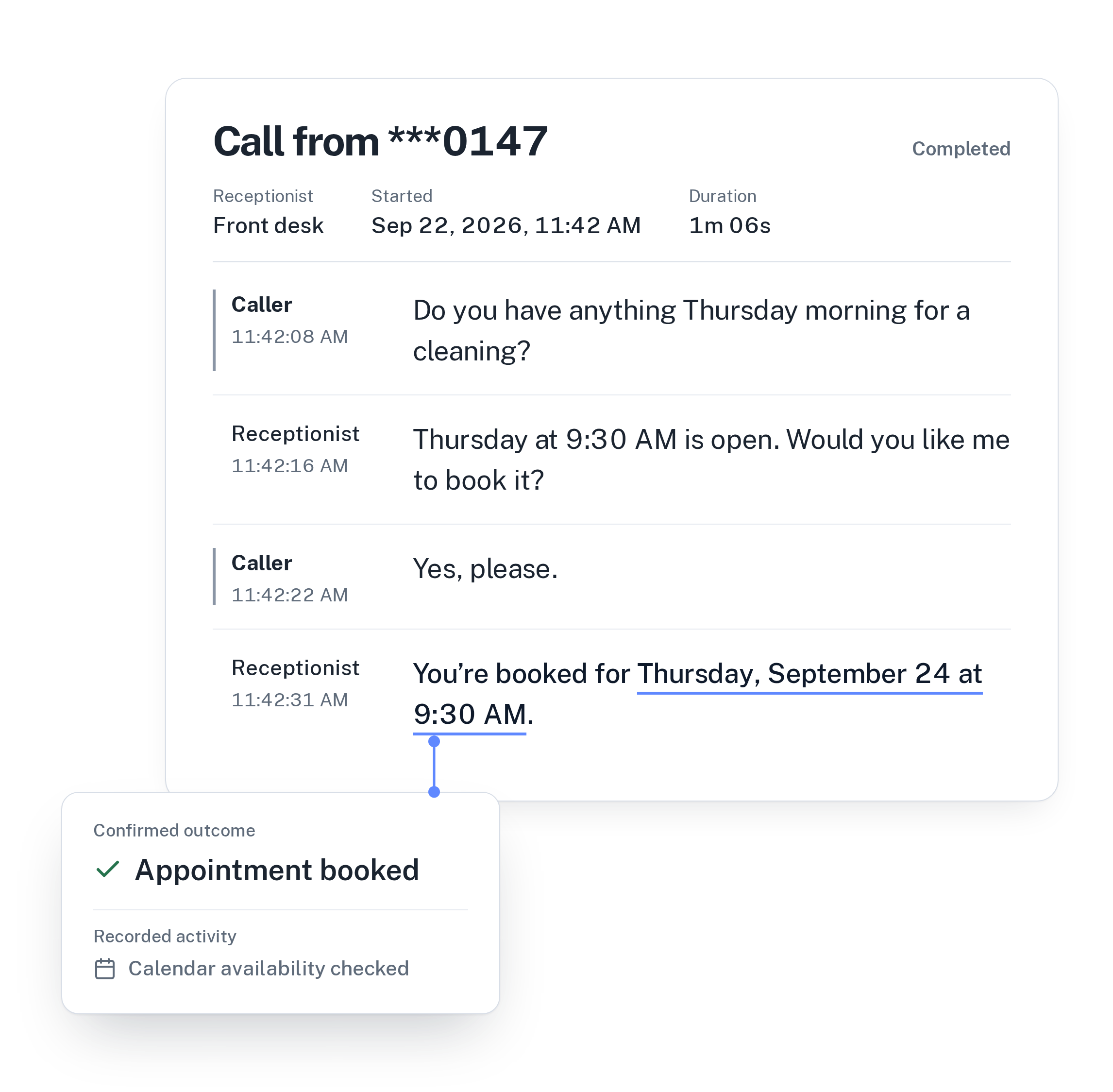
Instead of listening to voicemail, open the call history once a day. Every call has a transcript, a summary and a confirmed outcome, such as appointment booked, transferred or callback requested. You see at a glance which callers are already handled.
Work through the callback requests by priority. You already know why each person called and when they want to hear from you, so the calls are short.
Then look at the unanswered questions. WiseUnit collects the questions the receptionist couldn’t answer and turns them into suggested answers for you to approve. Approve one, publish, and the next caller gets that answer without you.
What it costs for one person
WiseUnit starts from €119 a month, or €99 a month on annual billing, excluding VAT. The Starter plan includes 1,000 call minutes, one phone number and one user, which fits a business run by one person. Every plan includes unlimited receptionists.
Compare the plans on the pricing page.
Frequently asked questions
Can callers book while I’m on a job?
Yes. With Google Calendar, Calendly or Cal.com connected, the receptionist books into free time in your calendar during the call and confirms only once the booking exists. Block the hours you are busy so it offers only times you can keep.
Will it put every caller through to my mobile?
No. Each receptionist has one transfer number, and calls are transferred only in the situations you describe in the instructions. You also decide whether transfers are allowed outside business hours. Everything else becomes a callback request.
What happens if a caller asks something I haven’t added?
The receptionist answers only from the facts, website pages and documents you approved. If the answer isn’t there, it takes a callback request, and the question shows up as an unanswered question you can turn into an approved answer.
What does it cost?
WiseUnit starts from €119 a month, or €99 a month on annual billing, excluding VAT, with 1,000 minutes included on the Starter plan. Every plan includes unlimited receptionists.