
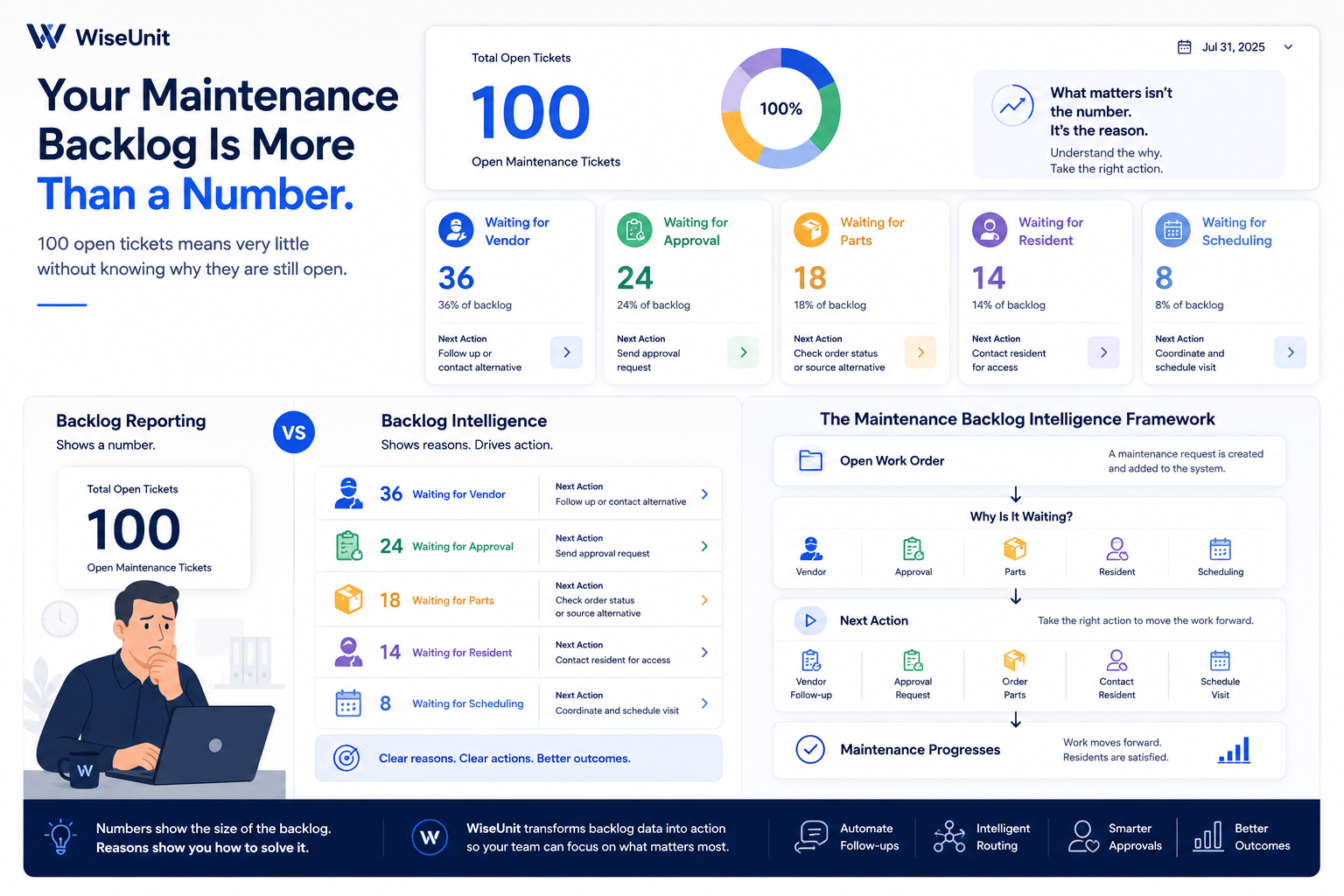
Why backlog size alone is not enough
The COO asks a simple question:
“How many maintenance tickets are still open?”
The answer comes back:
“One hundred.”
It sounds useful.
It may even appear on a dashboard in large blue numbers.
But what should the company do next?
Should it hire another coordinator?
Find more vendors?
Push managers to approve work faster?
Call residents who have not confirmed access?
Escalate parts orders?
The number 100 does not answer any of those questions.
It describes the size of the backlog.
It does not explain the backlog.
And until a property management company understands why work is still open, it cannot know what operational problem it is actually trying to solve.
The direct answer: What does a maintenance backlog tell you?
A maintenance backlog shows work that has not yet been completed.
By itself, the total number of open work orders does not show why the work is waiting, how serious it is, what resources it requires, or which intervention will reduce it.
A useful maintenance backlog should be broken down by:
- - reason it is still open
- - age
- - urgency
- - property
- - trade
- - vendor
- - approval status
- - next required action
Maintenance organizations outside property management make a similar distinction. Facilities management guidance notes that a backlog can include work scheduled for the future as well as past-due work, and that it is more meaningful when paired with estimated labor and cost—not treated as a simple count of unfinished tickets.
That is the main argument of this article:
The number shows how much work is open. The reasons show how to solve it.
The backlog review that wastes everyone’s time
Picture a weekly operations meeting.
A dashboard shows:
- - 100 open work orders
- - 32 overdue
- - average age of 8.4 days
- - 248 completed this month
The team discusses the total.
One manager says they need more vendors.
Another says approvals are too slow.
Another believes residents are not responding.
Someone suggests hiring.
Everyone may be right.
But the dashboard has not separated the causes, so the conversation becomes opinion-driven.
A better review would show:
Now the discussion changes.
The company does not simply have “100 open tickets.”
It has:
- - a vendor response problem
- - an approval problem
- - a parts dependency
- - an access problem
- - a smaller scheduling problem
Those are five different operating issues.
They should not receive one generic solution.
A backlog is not automatically evidence of failure
This is an important point.
Not every backlog is bad.
Some work should be open.
A replacement part may already be ordered.
A routine repair may be scheduled for next Tuesday.
A resident may have requested a later appointment.
A capital project may require approval.
Facilities-management practitioners often define backlog as all maintenance work that has not yet been completed, including work planned for future periods. Some even use backlog volume to understand whether staffing and scheduling capacity are balanced.
So the goal should not be:
“Get the backlog to zero.”
That can encourage teams to close work prematurely, avoid logging legitimate work, or prioritize easy tickets over important ones.
The better goal is:
Make sure every open work order has a valid reason, a clear owner, and a defined next action.
That is a much higher operating standard.
What is Maintenance Backlog Intelligence?
Maintenance Backlog Intelligence is the ability to understand not only how much maintenance work remains open, but also:
- - why each request is waiting
- - who or what it is waiting on
- - how long it has been in that state
- - what risk the delay creates
- - what action will move it forward
It turns a static count into an operational diagnosis.
A standard dashboard might say:
100 open tickets.
A backlog-intelligence dashboard should say:
36 are waiting for vendors, and 21 of those have received no response for more than two days.
That second statement is actionable.
The team can:
- - trigger follow-ups
- - add alternative vendors
- - escalate urgent jobs
- - identify poorly responding vendors
- - adjust routing rules
That is the difference between reporting and operating.
Why open-ticket totals can lead to the wrong decision
Imagine two companies with exactly 100 open work orders.
Company A
Most tickets are routine repairs already scheduled for the next five business days.
The work is open, but controlled.
Company B
Most tickets are waiting for vendors who have not replied.
The work is open and stalled.
The headline number is identical.
The operational health is completely different.
That is why comparing properties, regions, or coordinators only by total open tickets can be misleading.
A team with a larger backlog may simply manage more units or record work more accurately.
A team with a smaller backlog may be closing requests too early or failing to document deferred work.
The count needs context.
The five questions every backlog review should answer
A useful backlog review should answer five questions in order.
1. Why is the work still open?
This identifies the current constraint:
- - vendor
- - approval
- - parts
- - resident
- - scheduling
- - internal team
- - unclear scope
- - budget
2. How long has it been waiting in that state?
A work order that entered “waiting for vendor” this morning is different from one that has been there for nine days.
Total ticket age is useful.
Time in the current stage is often more useful.
3. What happens if it waits longer?
A loose cabinet handle and an unresolved water leak should not receive the same escalation.
The team needs to understand:
- - safety risk
- - property-damage risk
- - resident impact
- - compliance risk
- - cost of delay
4. Who owns the next action?
Every open ticket should have a clear next move.
For example:
- - vendor must respond
- - manager must approve
- - resident must confirm access
- - coordinator must schedule
- - supplier must deliver parts
A ticket without a next-action owner is not merely open.
It is unmanaged.
5. Can the next action happen automatically?
Some actions require judgment.
Others do not.
A system can often:
- - remind a vendor
- - request an approval
- - contact an alternative vendor
- - notify a resident
- - flag an expired timeline
- - update the PMS
- - escalate based on policy
That is where backlog intelligence becomes backlog execution.
“Waiting for vendor” is not one status
This is one of the details most dashboards miss.
A ticket labeled Waiting for Vendor may mean:
- - the vendor has not responded
- - the vendor accepted but has not provided a date
- - the vendor is preparing a quote
- - the preferred vendor declined
- - the company is waiting for a second bid
- - the vendor completed the visit but has not uploaded documentation
- - the vendor is waiting for resident access
Those situations need different actions.
Putting them under one status makes the backlog look organized while hiding the actual work.
Good maintenance data should describe the operational state precisely enough that the next action is obvious.
The most important backlog metric may not be ticket count
Ticket count is easy to measure.
But a more useful set of metrics may include:
- - median age by waiting reason
- - time spent in each workflow stage
- - percentage with no defined next action
- - percentage past the promised date
- - vendor-response delay
- - approval turnaround time
- - repeat maintenance requests
- - emergency work inside the backlog
- - estimated cost or labor required
IBM describes work-order management as a full process that includes approval, prioritization, planning, assignment, execution, documentation, and review—not merely the existence of an open record.
That matters because a work order can appear “in progress” while no progress is actually happening.
Rising costs make backlog quality more important
Backlog management is not only an efficiency issue.
It is a cost-control issue.
The National Apartment Association reported repairs and maintenance expenses of $1,098 per unit in 2024, up 28.2% from 2021. Administrative and payroll expenses reached $2,323 per unit, nearly 20% higher than in 2021.
When both maintenance and labor costs are rising, companies cannot afford to have coordinators manually inspect every open ticket to discover what is blocking it.
Nor can they afford to solve the wrong problem.
Hiring another coordinator will not fix a slow owner-approval process.
Adding vendors will not fix missing parts.
Sending more reminders will not help if nobody owns the next action.
The diagnosis must come before the intervention.
The real purpose of a backlog dashboard
A backlog dashboard should not make executives feel informed.
It should help the operations team decide what to do next.
That means it should answer:
What is stuck?
Why is it stuck?
How long has it been stuck?
What is at risk?
Who or what must act next?
Can WiseUnit move it automatically?
That is the standard we believe maintenance dashboards should meet.
Not another large number.
A clear operating plan.
The Backlog Action Matrix
A maintenance backlog becomes useful only when each category leads to a different response.
If every open work order receives the same treatment, the team is still managing the backlog as one large queue.
The better approach is to connect each waiting reason with:
- - the likely root cause
- - the risk of delay
- - the correct next action
- - the person or system responsible
- - the escalation rule
That creates a Backlog Action Matrix.
This is what turns backlog reporting into backlog management.
What “waiting for vendor” really tells you
A large vendor-related backlog can mean several different things.
It may mean the company does not have enough vendors.
But it could also mean:
- - requests are being sent to the wrong trade
- - the preferred vendor is overloaded
- - vendors receive incomplete job details
- - follow-ups are inconsistent
- - response expectations are unclear
- - low-performing vendors remain on the preferred list
- - teams wait too long before contacting an alternative
Those are different problems.
Hiring more vendors may help one of them.
It will not solve all of them.
The first step is to break the vendor backlog into smaller states.
For example:
- - vendor not contacted
- - vendor contacted, no reply
- - vendor accepted, no appointment
- - quote requested
- - quote received, awaiting review
- - preferred vendor declined
- - alternative vendor needed
- - completion evidence missing
Now the team knows what to do.
A ticket with no vendor contact needs dispatch.
A ticket with no reply needs follow-up or rerouting.
A ticket with an accepted job but no date needs scheduling.
A vague status creates more work because someone must investigate before acting.
What “waiting for approval” reveals
Approval delays are often treated as a manager problem.
Sometimes they are.
But slow approvals often begin before the request reaches the manager.
The approval may be missing:
- - a clear scope
- - comparable quotes
- - photos
- - urgency
- - budget impact
- - vendor compliance details
- - the consequences of waiting
A manager cannot make a fast decision from incomplete information.
So the solution is not always sending more reminders.
The approval request itself may need improvement.
A useful approval package should answer:
- - What needs to be repaired?
- - Why is the repair needed?
- - How urgent is it?
- - What are the available options?
- - What will each option cost?
- - Is the vendor compliant?
- - What happens if approval is delayed?
When those answers arrive together, approval becomes easier.
Approval thresholds should reduce unnecessary backlog
Not every repair should require the same approval path.
A $180 routine plumbing repair should not necessarily wait for the same review as a $12,000 roof project.
Companies can reduce approval backlog by defining rules such as:
- - automatic approval below a spending threshold
- - manager approval within a middle range
- - owner approval above a higher threshold
- - immediate dispatch for emergencies
- - preferred-vendor exceptions
- - property-specific limits
The purpose is not to remove control.
It is to place control where it adds value.
If every small repair needs senior approval, the process creates delay without creating better decisions.
What “waiting for parts” reveals
A parts backlog appears external.
The company is waiting for a supplier, so there may seem to be nothing to do.
But even when the dependency is external, the workflow still needs management.
The team should know:
- - when the part was ordered
- - who ordered it
- - expected arrival date
- - whether the part is backordered
- - whether a substitute exists
- - whether another vendor has stock
- - whether a temporary repair is possible
- - when the resident was last updated
Without this information, “waiting for parts” becomes a place where work orders disappear.
The ticket may remain open for weeks without a clear next action.
The goal is not to make the part arrive magically.
The goal is to make the delay visible, managed, and communicated.
What “waiting for resident” reveals
Resident-related delays are often more complex than they appear.
The resident may not have responded.
But the team should ask:
- - Which channel was used?
- - How many attempts were made?
- - Were appointment options offered?
- - Does the resident prefer calls, text, or email?
- - Is permission to enter available?
- - Is language support needed?
- - Is the issue still affecting habitability?
- - Should the property manager intervene?
A single unanswered email should not leave a maintenance request idle for ten days.
The workflow should define:
- - contact cadence
- - alternative channels
- - escalation timing
- - access rules
- - closure rules when the resident remains unreachable
The important distinction is between:
Waiting because the resident has not responded
and
Waiting because nobody followed up again
Only the first is truly a resident dependency.
What “waiting for scheduling” reveals
Scheduling backlog is usually a coordination problem.
The vendor has availability.
The resident has availability.
The property team has access requirements.
But those calendars do not align easily.
The traditional process creates a loop:
Vendor proposes Tuesday.
Resident cannot do Tuesday.
Resident proposes Thursday.
Vendor is unavailable Thursday.
Coordinator requests another time.
Days pass.
A scheduling backlog can reveal:
- - limited vendor availability
- - slow communication
- - narrow resident time windows
- - no permission-to-enter policy
- - manual calendar coordination
- - poorly defined appointment windows
The solution depends on the cause.
Sometimes the team needs another vendor.
Sometimes it needs broader scheduling windows.
Sometimes it simply needs a system that can coordinate responses continuously instead of waiting for a person to manage each message.
Backlog age should be measured by stage
Most dashboards measure one age:
Days since the work order was created.
That is useful, but incomplete.
Consider this ticket:
- - Day 1: request submitted
- - Day 1: vendor contacted
- - Day 2: vendor scheduled
- - Day 4: inspection completed
- - Day 4: quote submitted
- - Day 12: still waiting for approval
The work order is 12 days old.
But the operational problem is not a 12-day vendor delay.
It is an eight-day approval delay.
That is why teams should measure:
Total age
How long has the work order been open?
Stage age
How long has it been waiting in its current state?
Active work time
How much of the total timeline involved actual execution?
Idle time
How much time passed without a meaningful next action?
Stage age shows where the process is breaking.
Total age only shows that something took too long.
The difference between old work and risky work
The oldest ticket is not always the most important ticket.
A 30-day-old cosmetic repair may be controlled and scheduled.
A two-day-old active leak may create far more risk.
Backlog prioritization should consider:
- - urgency
- - safety risk
- - property-damage risk
- - resident impact
- - compliance exposure
- - age
- - promised completion date
- - financial impact
- - likelihood of escalation
This prevents teams from using a simple “oldest first” rule that may feel fair but produce poor operational outcomes.
The best next action is based on risk and context, not age alone.
The four types of backlog
It can help to separate maintenance backlog into four broader groups.
1. Controlled backlog
The next action is known.
The owner is clear.
The timeline is acceptable.
Example:
A routine repair is scheduled for next Tuesday.
This backlog is visible and managed.
2. Dependent backlog
The next action depends on an external party.
Example:
Waiting for a part or resident access.
This backlog needs follow-up and communication.
3. Stalled backlog
No meaningful action is happening.
Example:
A vendor has not replied for five days, and no alternative was contacted.
This backlog requires intervention.
4. Risk backlog
The delay creates safety, property, compliance, or resident risk.
Example:
An unresolved moisture issue is waiting for approval.
This backlog requires escalation.
A company with 100 open tickets might have:
- - 50 controlled
- - 25 dependent
- - 15 stalled
- - 10 high-risk
That tells leadership much more than the total.
A practical weekly backlog review
A strong backlog meeting should not involve reading through every ticket.
It should focus on exceptions and patterns.
Step 1: Review the composition
How much of the backlog is waiting for:
- - vendors
- - approvals
- - parts
- - residents
- - scheduling
- - internal action
Step 2: Review stage age
Which categories have been waiting longest?
Where is delay increasing?
Step 3: Review risk
Which open requests create:
- - safety risk
- - property damage
- - compliance exposure
- - severe resident impact
Step 4: Review ownership
Which tickets have no clear next-action owner?
Which teams or regions have recurring gaps?
Step 5: Review patterns
Are the same vendors causing delays?
Are the same managers holding approvals?
Are certain properties repeatedly waiting for access?
Are certain trades harder to schedule?
Step 6: Assign interventions
Examples:
- - add backup HVAC vendors
- - lower an approval threshold
- - change resident follow-up cadence
- - create a parts escalation process
- - automatically reroute unanswered vendor requests
A backlog review should end with decisions.
Not another report.
What leaders should ask instead of “How many tickets are open?”
The better questions are:
What percentage of the backlog is actively progressing?
Which waiting reason is growing fastest?
Which stage creates the most idle time?
How many tickets have no defined next action?
Which vendors account for the most stalled work?
Which approvals are past their expected response time?
Which open requests create the greatest risk?
How much of the backlog could move forward automatically today?
These questions reveal operating quality.
The total open-ticket count does not.
How WiseUnit turns backlog insight into action
WiseUnit should not be positioned as another dashboard that reorganizes open tickets.
Its value is what happens after the reason is identified.
For example:
If a ticket is waiting for a vendor
WiseUnit can follow up, contact an alternative vendor, or escalate based on company rules.
If it is waiting for approval
WiseUnit can package the quote, scope, pricing context, and urgency into a clear approval request.
If it is waiting for a resident
WiseUnit can send another message through the correct channel and propose appointment options.
If it is waiting for scheduling
WiseUnit can coordinate availability between the vendor and resident.
If no action occurs within policy
WiseUnit can escalate the ticket rather than allowing it to sit unnoticed.
This is the difference between Backlog Intelligence and a backlog report.
One explains the delay.
The other helps remove it.
The principle to remember
A maintenance backlog should not be treated as one problem.
It is a collection of different operational states.
Each state requires a different response.
That means the most useful backlog dashboard is not the one that shows the largest number most clearly.
It is the one that makes the next action obvious.
The future of maintenance dashboards
For years, maintenance dashboards have focused on reporting activity.
Open tickets.
Closed tickets.
Average completion time.
Monthly volume.
Those numbers are useful.
But they're retrospective.
They tell you what has happened.
The next generation of maintenance dashboards should answer something more valuable:
What should we do next?
That's the difference between reporting and operational intelligence.
The dashboard shouldn't simply display the backlog.
It should help eliminate it.
A healthy backlog is not an empty backlog
One of the biggest misconceptions in maintenance operations is that success means having zero open work orders.
In reality, every property management company will have work in progress.
Parts will be on order.
Routine repairs will be scheduled for next week.
Residents will request later appointments.
Capital repairs will wait for approval.
An empty backlog isn't necessarily healthy.
A healthy backlog is one where:
- - every ticket has a clear reason for being open
- - every ticket has a defined next action
- - every delay has an owner
- - every waiting stage is visible
- - every high-risk issue receives immediate attention
The goal isn't to eliminate work.
The goal is to eliminate uncertainty.
The backlog should become a management tool
Imagine walking into your Monday operations meeting.
Instead of discussing:
"We have 127 open work orders."
The discussion becomes:
- - Vendor response delays increased by 18% this week.
- - HVAC approvals are taking twice as long as plumbing approvals.
- - One vendor accounts for 34% of stalled work.
- - Most overdue tickets are waiting for resident access.
- - Emergency backlog is down 40%.
- - Routine scheduling improved after adding a second vendor.
Now the conversation isn't about the number.
It's about the operation.
That's where better decisions come from.
Better backlog visibility creates better business decisions
Backlog Intelligence affects far more than maintenance.
It helps answer strategic questions.
Should we hire another maintenance coordinator?
Should we expand our preferred vendor network?
Should we adjust approval thresholds?
Should we renegotiate with certain vendors?
Should we stock commonly used parts?
Should we improve resident communication?
Without understanding why work is waiting, those decisions become guesswork.
Backlog Intelligence provides the context leaders need to invest in the right improvements.
Better data creates better vendor relationships
Vendor performance shouldn't only be measured by completed jobs.
It should also consider how vendors contribute to—or reduce—the backlog.
For example:
- - How quickly do they respond?
- - How often do they decline work?
- - How long do they take to schedule?
- - How frequently do they require follow-up?
- - How many repairs remain unresolved?
- - How often do quotes arrive on time?
Those operational signals help property managers build stronger vendor networks over time.
The goal isn't simply to find vendors.
It's to understand how vendors affect maintenance execution.
The next KPI isn't backlog size
Every blog in this series has introduced a new operational idea.
- - The Maintenance Execution Gap
- - Operational AI
- - Maintenance Routing
- - Maintenance Resolution Rate
Now we introduce another:
Maintenance Backlog Intelligence
Not:
"How many tickets are open?"
Instead:
"Why is work waiting, and what action removes the delay?"
That's a fundamentally different KPI.
One measures volume.
The other measures operational health.
Why this matters more as portfolios grow
A company managing 300 units might review every maintenance request manually.
A company managing 3,000 units cannot.
A company managing 30,000 units certainly cannot.
As portfolios scale, leadership needs systems that identify patterns instead of asking people to inspect every individual work order.
That's why Backlog Intelligence becomes increasingly valuable.
It helps organizations move from reactive maintenance management to proactive operational management.
Instead of searching for delays after residents complain, teams can identify bottlenecks while they're still developing.
How WiseUnit fits into the workflow
WiseUnit isn't designed to become another dashboard that displays open tickets.
Its role is to help move maintenance work forward.
When the platform identifies why work is waiting, it can help execute the next operational step according to your company's rules.
For example:
- - Follow up with vendors automatically.
- - Route approvals with the right context.
- - Remind residents about scheduling.
- - Surface stalled work before it becomes overdue.
- - Escalate high-risk delays.
- - Synchronize updates with your Property Management System.
- - Track how long work remains in each operational stage.
The result isn't simply better visibility.
It's better execution.
And over time, better execution leads to a healthier backlog.
Final thoughts
A maintenance backlog is often treated like a scoreboard.
But a scoreboard doesn't tell you why you're winning—or losing.
The same is true for maintenance.
One hundred open work orders might represent a healthy operation.
Or a struggling one.
Without understanding why work is still open, the number alone has very little meaning.
The best maintenance organizations don't just measure backlog.
They understand it.
Because every open work order is telling a story.
The question is whether your operation knows how to read it.
Frequently Asked Questions
- What is a maintenance backlog?
- A maintenance backlog is the collection of maintenance work orders that remain open or incomplete. It may include scheduled work, deferred maintenance, pending approvals, waiting-for-parts requests, and active repairs.
- Is having a maintenance backlog always a bad thing?
- No. Some backlog is expected in any maintenance operation. The important question is whether every open work order has a valid reason, a clear owner, and a defined next action.
- What is Maintenance Backlog Intelligence?
- Maintenance Backlog Intelligence is the practice of analyzing why maintenance requests remain open rather than simply counting them. It helps identify operational bottlenecks, prioritize action, and improve maintenance execution.
- What causes maintenance backlogs?
- Common causes include: Waiting for vendors Approval delays Parts availability Resident scheduling Internal coordination Vendor capacity Incomplete job information Understanding which cause is responsible is more valuable than simply measuring the total number of open work orders.
- How can AI help manage maintenance backlogs?
- AI can help classify backlog reasons, identify stalled work, automate vendor follow-ups, route approvals, coordinate scheduling, notify residents, and surface operational bottlenecks before they become larger problems.