
How an AI receptionist answers calls for a dental practice
What an AI receptionist does on calls to a dental practice, what to teach it, which calls still go to your team and how to set it up.
Why the phone is hard to answer at the front desk
In a small dental practice, the person who answers the phone is usually also checking patients in, taking payments, confirming tomorrow’s schedule and helping the dentist between appointments. When two patients are standing at the desk, the phone waits.
Most calls to a practice are routine. Someone wants a cleaning next month, a new patient asks whether you are taking on new patients, a parent wants to know if you see children, and someone asks about payment plans. But a call that goes to voicemail is often a patient who books with the next practice that picks up.
An AI receptionist answers those calls on your practice’s number, handles the routine ones itself and gets the rest to your team with the details already written down.
What happens when a patient calls
Here is how a typical practice call runs in WiseUnit.
- The receptionist answers immediately with the greeting you wrote, for example the practice name and a short line on what it can help with.
- The caller says what they need. The receptionist asks the follow-up questions you set, such as their name, whether they are a new or existing patient and what the visit is for.
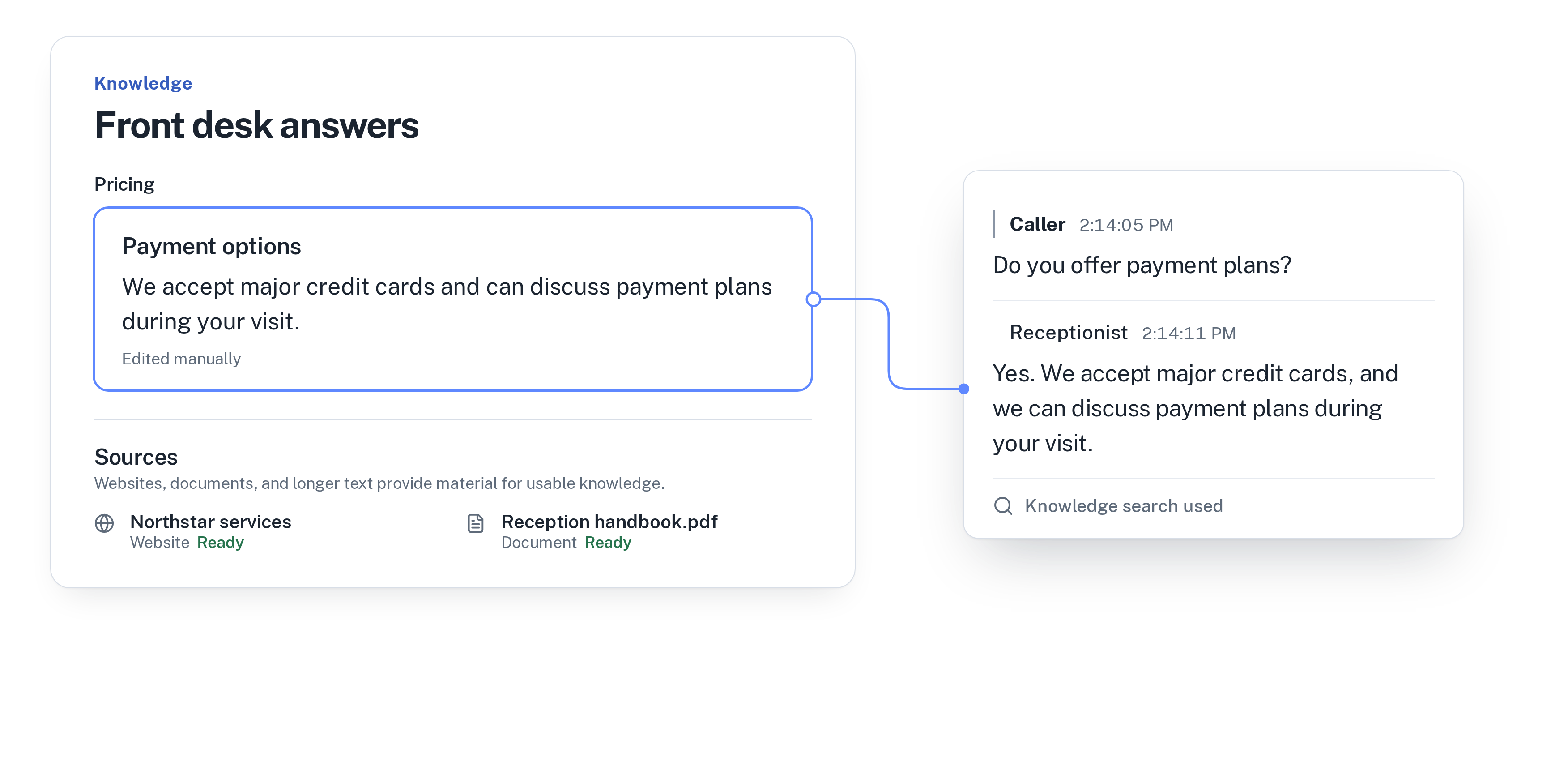
- If it is a question your knowledge covers (opening hours, treatments you offer, whether you see children, insurance and payment options, parking), it answers with the wording you approved.
- If the caller wants an appointment, it checks your calendar during the call, offers an open slot and books it. It tells the caller the appointment is booked only once the calendar has it.
- If the caller needs the dentist or the front desk, it transfers the call to your transfer number. If nobody can take it, it records a callback request with the reason, the preferred callback time and a priority.
- The transcript and the outcome, such as “Appointment booked” or “Callback requested”, are saved in your call history.
What to teach it about your practice
The receptionist answers from the facts, website pages and documents you add and approve. For a dental practice, the most useful information is what patients ask before they book.
If you are starting from scratch, our guide on how to train an AI receptionist on your business walks through what to add first.
- Opening hours, including early or late days and holiday closures.
- The treatments you offer and the ones you refer out, for example cleanings, fillings, whitening, implants or orthodontics.
- Whether you are accepting new patients and whether you see children.
- Which insurance plans you accept and the payment options you offer, said the same way every time.
- Prices you are happy to give on the phone, such as a new-patient exam, and a clear line for everything else: “The dentist will give you a treatment plan and a cost estimate after the exam.”
- What new patients should bring, parking and how to find the practice.
Booking check-ups and new patients
WiseUnit books into Google Calendar, Calendly or Cal.com. With Calendly you need a paid Calendly plan, and with Calendly or Cal.com the receptionist asks the caller for an email address, because the booking needs one.
The receptionist offers the open slots your calendar shows, so the calendar should show only the times you want booked over the phone. Check-ups, cleanings and new-patient exams are a good fit. A long implant appointment that the dentist plans in person is not.
It books new appointments. It does not move or cancel existing ones, so a patient who wants to change an appointment can be put through to the front desk or left as a callback request.
Calls that still need your team
Some calls depend on a specific patient. “When is my next appointment?”, “Is my crown ready?” and “Why is my bill higher than expected?” all need the patient’s file. WiseUnit does not look into your practice management software or patient records, so these calls are transferred or turned into a callback with the patient’s name and question.
Clinical questions stay with your team too. Add an approved line saying the dentist answers questions about symptoms and treatment, and set the instructions so those calls are put through or turned into a callback.
You decide which calls go through. Each receptionist has one transfer number, and the instructions say which situations should be put through, for example a patient in severe pain or with swelling. You can allow transfers outside business hours if a dentist is on call. If nobody is on call, add the approved line you want callers to hear about where to get urgent care, so it is said the same way every time.
Evenings, weekends and other languages
Many patients think about booking after work, when the practice is closed. The receptionist answers every call 24/7, so evening calls get the same answers, bookings and callback requests as calls at 10 AM.
Each receptionist speaks one language: English, German, Italian, French, Spanish, Polish or Turkish. If your patients call in more than one, you can run a receptionist for each, since every plan includes unlimited receptionists.
Changes stay in draft until you publish them, so nothing reaches patients before you approve it. Once calls come in, call summaries, call analytics and the list of unanswered questions show you what patients ask that your knowledge doesn’t cover yet. Approve an answer once and it is used on every call after that.
Getting started
Connect a phone number, add your hours, treatments and payment options, connect your calendar, set the transfer number and publish. Then call your own practice and listen to how it handles a new-patient booking and a “Can I move my appointment?” call.
WiseUnit plans start at €119 a month excluding VAT, or €99 a month on annual billing, with 1,000 included minutes on Starter.
See how it works for dentists on the dental practices page, or compare plans on the pricing page.
Frequently asked questions
Can the AI receptionist look up a patient’s appointment or records?
No. WiseUnit does not look into your practice management software or patient records. Calls like this are transferred to your team or recorded as a callback request with the patient’s name and question.
Can patients reschedule or cancel through the receptionist?
It books new appointments but does not move or cancel existing ones. A patient who wants to change an appointment is transferred to your front desk or left as a callback request.
What happens to urgent calls after hours?
The receptionist answers every call 24/7. You can allow transfers outside business hours if a dentist is on call, and add an approved line about where to get urgent care for when nobody is available.
How much does it cost for a dental practice?
Plans start at €119 a month excluding VAT, or €99 a month on annual billing, with 1,000 included minutes on Starter and unlimited receptionists on every plan.